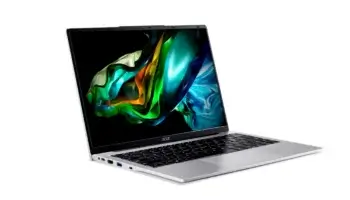
Looking for a reliable laptop that won’t break the bank? The Acer Aspire Lite AL14-51M-364B might just be what you need. Priced at around ₱31,000, this laptop is designed for students, remote workers, and casual users who want something portable, fast, and easy to use. Let’s dive into why this laptop could be a great fit for you!
Key Features of Aspire Lite AL14-51M and What They Mean for You
- Operating System: Windows 11 Home – The latest version of Windows, easy to use and packed with features for productivity and entertainment.
- Processor: Intel® Core™ i3 (12th Gen) – This is the “brain” of your laptop. It’s good for everyday tasks like browsing, writing papers, or watching videos.
- Graphics: Intel® UHD Graphics – Perfect for watching movies, streaming shows, and doing basic photo editing. It’s not designed for high-end gaming, though.
- Display: 14-inch Full HD screen (1920 x 1200) – This gives you clear, crisp visuals for everything from spreadsheets to YouTube.
- RAM (Memory): 8GB DDR5 – Think of this as your laptop’s multitasking ability. The more RAM, the more tasks your laptop can handle at once without slowing down.
- Storage: 512GB SSD – This is the space where all your files and programs live. An SSD makes everything faster, like booting up your laptop and opening files.
- Wi-Fi: Wi-Fi 6 – Super-fast and reliable internet connection, even in busy households.
- Ports: USB and HDMI – Plenty of places to plug in accessories like a mouse, flash drive, or even an extra monitor.
- Weight: Only 1.5 kg – Lightweight and easy to carry around, whether you’re heading to class or working from a coffee shop.
How to Download Drivers for the Acer Aspire Lite AL14-51M-364B
Downloading drivers (which help your laptop’s hardware work properly) is simple:
- Go to the Acer Support Website.
- Enter “Aspire Lite AL14-51M-364B” in the search bar.
- Choose your operating system (Windows 11).
- Download the drivers you need (like for Wi-Fi, audio, etc.).
- Follow the steps to install them, then restart your laptop.
You can also check my provided link to download all the drivers, product documentation, and essential applications for the Aspire Lite AL14-51M-364B, optimized for Windows 11, can be found in one convenient location.
These include crucial updates for Wi-Fi, Bluetooth, chipset, and BIOS firmware, ensuring that your device runs at peak performance.
How well does the Aspire Lite AL14 perform?
Processor Power
The Intel Core i3 processor is like the engine of your car—it powers everything.
With 6 cores and 8 threads, this laptop handles common tasks like opening multiple tabs in your browser.
Using apps like Microsoft Word, and even light editing. While it’s not made for heavy-duty gaming or video production, it’s perfect for day-to-day activities.
Smooth Multitasking with RAM
With 8GB of RAM, this laptop can juggle several things at once without slowing down.
Whether you’re switching between a video call and writing a report, or running multiple apps, you won’t notice much lag.
Fast and Spacious Storage
The 512GB SSD (Solid State Drive) is a big deal when it comes to speed. It helps the laptop start up quickly and loads apps fast, so you won’t be stuck waiting for things to open.Plus, there’s plenty of space to store photos, files, and apps—enough for most users.
Designed for Portability and Simplicity
Weighing just 1.5 kg, this laptop is light enough to carry with you wherever you go. Whether you’re a student with back-to-back classes or someone who works on the go, the Acer Aspire Lite AL14 won’t weigh you down.

The design is simple and sturdy, though it’s mostly made of plastic. It’s durable enough for daily use, but keep in mind, this isn’t a high-end metal laptop.
Also, there’s no keyboard backlight, which could be a downside if you often work in dimly lit places.
Vibrant Display for Everyday Use
The 14-inch Full HD display is bright and clear, giving you sharp images and text. It’s perfect for watching Netflix, working on projects, or simply browsing the web. The screen also has IPS technology, which means you get great viewing angles—so even if you’re not looking straight at the screen, it still looks good.
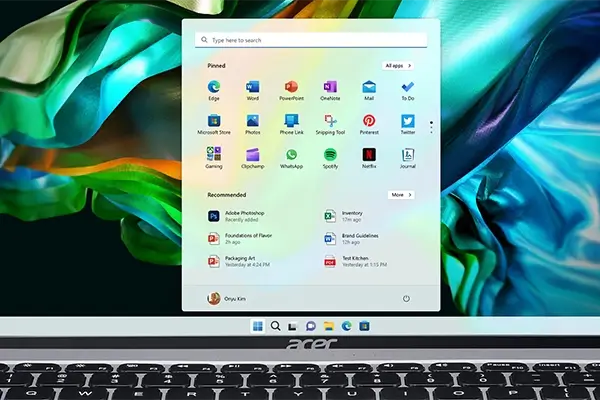
The matte finish (called ComfyView) helps reduce glare, so you won’t struggle as much when you’re working in bright rooms or near windows. However, it’s not designed for intense color work, like graphic design, since it covers only 45% of the NTSC color range. For most people, this won’t be an issue.
Battery and Connectivity: All-Day Power and Plenty of Ports
Battery Life
The 65W charger powers up your laptop quickly, and you can expect around 6-8 hours of battery life depending on what you’re doing. This should last you through most of your workday or study sessions without needing to be plugged in.
Plenty of Ports

This laptop comes with 3 USB-A ports, a USB-C port, and an HDMI port. Whether you need to connect an external mouse, keyboard, or even a second monitor, you’ll have all the connectivity you need.
It’s also equipped with Wi-Fi 6, meaning you’ll get a super-fast and stable internet connection, which is a huge plus if you’re streaming or attending online classes.
Is It Worth the Price?
For around ₱31,000, the Acer Aspire Lite AL14 offers great value. You’re getting a 12th-generation Intel processor, fast SSD storage, and plenty of RAM.
While it’s not a high-performance machine for gamers or video editors, it’s perfect for students, home workers, or anyone who needs a reliable laptop for everyday tasks.
Pros and Cons
| Pros | Cons |
|---|---|
| Affordable price | No backlit keyboard |
| Lightweight and portable | Not suited for heavy gaming |
| Sharp Full HD display with anti-glare | Basic plastic build |
| Fast SSD storage (512GB) | Limited color accuracy for designers |
| Multiple ports (USB, HDMI) | No keyboard backlighting |
Who Should Buy This Laptop?
The Acer Aspire Lite AL14-51M-364B is ideal for students, remote workers, and casual users who need a dependable laptop for tasks like web browsing, writing, streaming, and light multitasking.
It’s perfect if you’re looking for something that’s affordable, lightweight, and easy to carry around—without needing all the extra bells and whistles.
Verdict
The Acer Aspire Lite AL14-51M-364B offers great performance for the price. It’s fast, portable, and has everything you need for everyday tasks, making it a great option for anyone looking for a budget-friendly laptop.
If you’re a student or just need a reliable work-from-home laptop, this is definitely one to consider!
Frequently Asked Questions (FAQ)
1. Is the Acer Aspire Lite AL14-51M-364B good for students?
Yes! It’s lightweight, affordable, and has enough power for everyday tasks like browsing, writing papers, and video streaming, making it ideal for students.
2. Can I use the Acer Aspire Lite AL14-51M-364B for gaming?
This laptop is not designed for heavy gaming, but it can handle light, casual games. Its integrated Intel UHD graphics are more suited for basic tasks rather than graphics-intensive gaming.
3. How long does the battery last on the Acer Aspire Lite AL14-51M-364B?
On average, the battery lasts between 6 to 8 hours, depending on your usage. This makes it great for all-day school or work without needing to be plugged in constantly.
4. Does the Acer Aspire Lite AL14-51M-364B have a backlit keyboard?
No, this model does not have a backlit keyboard, so it might be harder to use in dimly lit environments.
5. What type of display does the Acer Aspire Lite AL14-51M-364B have?
It features a 14-inch Full HD (1920 x 1200) IPS display with a matte finish, offering good clarity and reducing glare, but it’s not designed for professional-level color accuracy.
6. Is this laptop good for multitasking?
Yes, with its 8GB of DDR5 RAM and Intel Core i3 processor, this laptop handles multitasking well, making it suitable for running multiple applications simultaneously.
7. How much storage does the Acer Aspire Lite AL14-51M-364B have?
It comes with a fast 512GB SSD, which provides plenty of space for most users to store files, apps, and media while also speeding up boot times and file loading.
8. Can I upgrade the RAM or storage on the Acer Aspire Lite AL14-51M-364B?
The RAM is typically soldered in and non-upgradable, but some models allow storage upgrades. It’s best to check with Acer or a local service center for upgrade options.
9. Does it come with Windows 11 pre-installed?
Yes, the Acer Aspire Lite AL14-51M-364B comes with Windows 11 Home Single Language pre-installed, offering the latest features and security updates.
10. How is the build quality of the Acer Aspire Lite AL14-51M-364B?
The laptop has a plastic build, which is durable for everyday use. It’s not premium like metal laptops but offers good portability at a budget-friendly price.