Paper jam in printers can be super frustrating, especially when you’re in the middle of an important print job. If you’re using an Epson Inkjet printer, you might encounter a few common causes for these jams.
Don’t worry, though—most of these issues can be fixed with a little know-how! Let’s dive into the common problems and how to solve them.
Common Causes of Paper Jam in Epson Inkjet Printers
Obstacles in the Paper Path
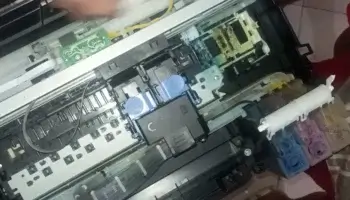
One of the most common reasons for a paper jam is an object blocking the paper path. It could be something as simple as a small piece of paper, or even items like coins or staples that accidentally fell into the printer. When the paper tries to feed, it gets stuck on the obstruction, triggering a jam.
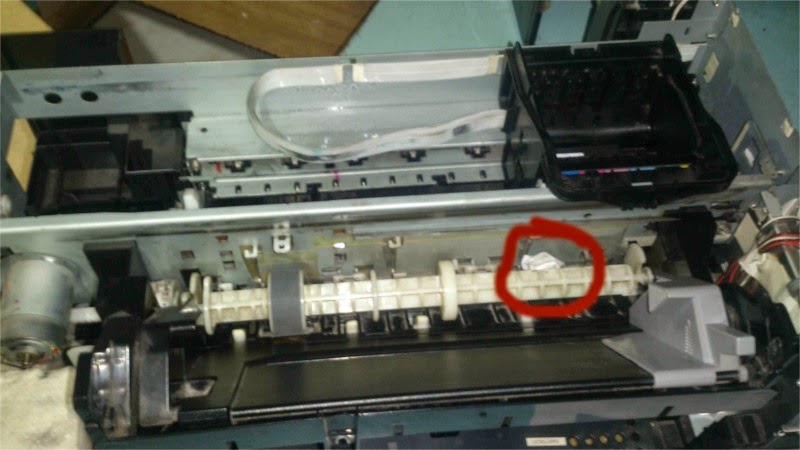
This is the number one culprit behind paper jams.
Loose or Broken Springs
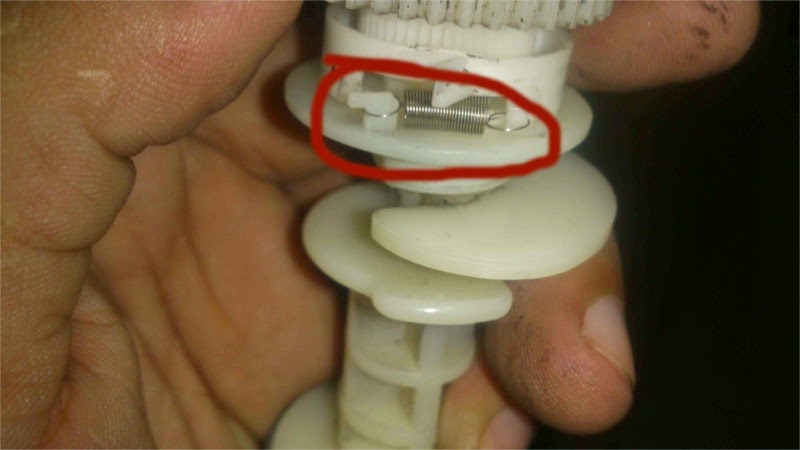
Sometimes, the spring that helps the paper feeder work becomes loose or breaks. When this happens, the printer struggles to feed the paper properly. You’ll notice that the paper might start feeding on one side, but not the other, leading to a jam.

This issue is more common in certain Epson models like the Epson T60, Epson L800 Series, Epson L850, Epson L805 , and among others. To check for this, you may need to disassemble the paper feeder and inspect the spring. If it’s loose or out of place, simply realign it and secure it back in its proper position. This problem often happens if you’ve been feeding thick paper or loading too many sheets into the tray.
Faded Paper Feeder Rubber is the Main Reason of Paper Jam
Over time, the rubber in the paper feeder can wear down and lose its grip. When this happens, the printer has trouble picking up paper from the tray, which can lead to jams or failed print attempts. If the rubber is worn out, the best solution is to replace it with a new one.
Broken Parts, Like Rollers (Rare)
In some rare cases, parts of the printer, such as the rollers or spring connectors, can break. If this happens, you’ll likely need to replace the broken component. This is less common but can occur if foreign objects like coins or small metal items get stuck in the printer and cause damage.
How to Fix a Paper Jam in an Epson Inkjet Printer
Let’s say your printer has jammed, and you’re ready to fix it. Here’s a simple step-by-step guide:
- Check for Obstacles – Look inside the printer’s paper path for any objects or pieces of paper blocking the way. Gently remove anything you find.
- Inspect the Spring – If the paper isn’t feeding correctly, check if the spring inside the paper feeder is loose or misaligned. If it is, carefully place it back into its proper position.
- Replace Faded Rubber – If the rubber in the paper feeder is worn out, it’s time to replace it. You can find replacement parts online or at printer service centers.
- Handle Broken Parts – If you find broken parts like rollers or connectors, you may need to replace the entire plastic piece or component.
Why Do These Issues Happen?
Paper jams can happen for several reasons, but they’re most common when:
- You’re using thicker paper than the printer is designed to handle.
- You’ve overloaded the paper tray with too many sheets.
- Foreign objects accidentally fall into the printer (coins, staples, etc.).
These issues tend to happen more frequently in Epson Inkjet printers with six-color print output, like the Stylus Photo R290, R350, and T60 models.
Final Thoughts
Dealing with paper jams in your Epson Inkjet printer can be annoying, but most of the time, it’s an easy fix. Whether it’s a loose spring, faded rubber, or an unexpected object blocking the paper path, following these steps can help you get your printer up and running again in no time. If the problem persists after trying these fixes, you might want to consult a professional technician.
Happy printing, and remember to check for those sneaky coins and paper clips! 😄
FAQ: Fixing Paper Jam in Epson Inkjet Printers
1. What causes paper jams in Epson Inkjet printers?
The most common causes include:
- Obstacles (like paper scraps, coins, or staples) blocking the paper path.
- Loose or broken springs that affect the paper feeder.
- Worn-out paper feeder rubber that no longer grips the paper properly.
- In rare cases, broken parts like rollers or connectors.
2. How can I fix a paper jam in my Epson printer?
Start by:
- Checking for any objects inside the paper path and removing them.
- Inspecting the paper feeder spring for any misalignment or looseness, and reattaching it if necessary.
- Replacing faded rubber in the paper feeder if it’s no longer gripping the paper.
- If parts are broken, you may need to replace the damaged components.
3. Why does my Epson printer keep jamming even after clearing the paper?
If the printer continues to jam, there might be an underlying issue such as:
- A loose spring that needs realignment.
- Faded rubber that’s failing to feed paper properly.
- Hidden debris or small objects still lodged in the printer’s paper feed system.
4. How do I know if the spring in my Epson printer is the problem?
If your printer tries to pick up the paper but only grabs one side, or if the paper feeder doesn’t move as smoothly as before, the spring could be loose or misaligned. You’ll need to open up the paper feeder area to check if the spring is still attached correctly.
5. Can I replace the faded rubber in the paper feeder myself?
Yes, it’s usually a straightforward process. You can purchase replacement rubber online or from a printer service center. Just make sure to follow the manufacturer’s instructions when removing the old rubber and attaching the new one.
6. Is it safe to open my Epson printer to check for these issues?
As long as you’re careful, it’s safe to inspect and fix common problems like loose springs or faded rubber. Just make sure to gently remove covers and parts without pulling on any wires or forcing pieces apart. If you’re unsure, it’s best to consult a professional technician.
7. Why do paper jams happen more often with thicker paper?
Epson printers have specific limits for paper thickness. If you use paper that’s too thick or overload the tray, it can strain the paper feeder, causing jams or even damaging the internal components like springs or rollers.