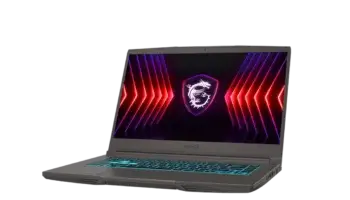
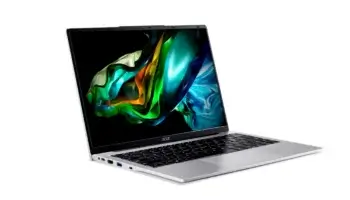
The MSI Gaming Thin A15 B7UCX – 084PH is a powerful yet affordable gaming laptop, offering high-end features without the premium price tag. With a price point of around Php 39,000 in Shoppe as of October 2024, it provides solid gaming performance, multitasking capabilities, and a sleek design—all while being budget-friendly.
Quick Facts About the MSI Gaming Thin A15 B7UCX-084PH
- Marketing Model Breakdown: The MSI Thin A15 B7U series comes in two variants:
- Thin A15 B7UC – Equipped with RTX 3050 graphics.
- Thin A15 B7UCX – Equipped with RTX 2050 graphics.
- Philippines Model: This review focuses on the MSI Gaming Thin A15 B7UCX-084PH, which is marketed in the Philippines.
- US Version: In the United States, this model is known as the MSI Thin A15 B7UCX-218US and is priced at around 700 US dollars.
- Target Audience: Both models are designed for gamers and multitaskers looking for an affordable, powerful laptop.
Whether you’re a gamer, student, or professional, this laptop delivers the performance you need for everyday tasks and entertainment. Let’s dive into the full review and see why the MSI Gaming Thin A15 B7UCX-084PH stands out.

Key Features and Specifications
- Operating System: Windows 11 Home
- Processor (CPU): AMD Ryzen™ 7 7735HS – Ideal for multitasking and gaming, this 7-series processor offers smooth performance for intensive tasks.
- Graphics (GPU): NVIDIA® GeForce RTX™ 2050 Laptop GPU with 4GB GDDR6 – Ensures good performance for modern games and creative software.
- Memory (RAM): 8GB DDR5-4800, expandable up to 64GB – Handles multiple tasks at once, making it great for multitasking.
- Storage: 512GB NVMe PCIe Gen4 SSD – Fast boot times and quick file access, plus enough storage for games, documents, and media files.
- Display: 15.6″ Full HD (1920×1080) with a 144Hz refresh rate – Perfect for gaming, offering smooth visuals with sharp clarity.
- Connectivity: Wi-Fi 6E and Bluetooth 5.3 – Stable and fast internet connections, whether you’re gaming or streaming content.
- Ports: Includes USB-C, USB 3.2 Gen1, HDMI 2.1, and RJ45 for LAN – Plenty of options for peripherals, external monitors, and wired internet.
- Battery: 3-cell 52.4 Whr – A decent battery size for a gaming laptop, offering several hours of light use before needing a charge.
- Weight: 1.86 kg – Lightweight for a gaming laptop, making it portable enough to carry around.
- Color: Cosmos Gray – Sleek and modern design.
How to Download Drivers for MSI Gaming Thin A15 B7UCX-084PH
- Visit the MSI Support Website.
- In the search bar, type MSI Gaming Thin A15 B7U and select your appropriate model.
- Select your operating system (Windows 11).
- Scroll down to the “Drivers” section and download the necessary drivers (e.g., Wi-Fi, graphics, audio).
- Install the drivers by following the on-screen instructions.
- Restart your laptop to complete the installation.
You can also check my provided link to download all the drivers, product documentation, and essential applications for the MSI Gaming Thin A15 B7UCX, optimized for Windows 11, can be found in one convenient location.
These include crucial updates for Wi-Fi, Bluetooth, chipset, and
BIOS firmware, motherboard manual, ensuring that your device runs at peak performance.
Performance of MSI Gaming Thin A15 B7U
Processor (CPU)
The AMD Ryzen 7 7735HS is a high-performance processor designed to handle demanding applications and multitasking with ease.
Whether you’re gaming, editing videos, or working with large datasets, this CPU offers the power to keep everything running smoothly. It’s also energy-efficient, ensuring longer battery life during less intensive tasks.
RAM
With 8GB of DDR5-4800 memory, the laptop is well-equipped to handle multiple applications at once. Whether you’re switching between gaming and work or running multiple programs, the RAM ensures lag-free performance.
And if you need more power, you can upgrade the RAM to 64GB, making it future-proof for more demanding tasks.
Storage
The 512GB SSD is perfect for gamers and professionals alike. SSDs are faster than traditional HDDs, meaning your laptop will boot up in seconds, and games and files will load quickly.
Plus, with PCIe Gen4 technology, file transfers are lightning fast. It’s an ideal amount of storage for most users, offering space for your favorite games, software, and media.
Design and Build Quality MSI Gaming Thin A15 B7UCX
The MSI Gaming Thin A15 B7UCX-084PH offers a sleek, modern design with a lightweight build of just 1.86 kg. Despite its plastic construction, it feels sturdy and well-built, making it durable for daily use.
The Cosmos Gray finish gives it a professional look, which is great for students or professionals who need a laptop that works for both gaming and the office.

Portability is also a key feature. Although gaming laptops are usually heavier, this model strikes a balance, making it easier to carry in a backpack or laptop bag.
Display
One of the standout features of the MSI Gaming Thin A15 B7UCX-084PH is its 15.6-inch Full HD display. With a resolution of 1920×1080 and a 144Hz refresh rate, the display is ideal for gaming.
The high refresh rate ensures smooth visuals, reducing motion blur during fast-paced games like first-person shooters or racing games. For those doing creative work or watching movies, the sharp image quality and vibrant colors enhance the experience.
Power and Connectivity
Battery Life
The 3-cell 52.4 Whr battery provides decent battery life for light tasks such as web browsing, document editing, and streaming. However, during gaming or intensive applications, it’s best to stay plugged in for optimal performance.
Ports and Connectivity
The MSI Gaming Thin A15 B7UCX-084PH offers a wide range of connectivity options:
- 1x USB-C (USB 3.2 Gen2 / DisplayPort™/ Power Delivery 3.0)
- 3x USB-A (USB 3.2 Gen1)
- 1x HDMI™ 2.1 (8K @ 60Hz / 4K @ 120Hz) for external monitors
- 1x RJ45 for LAN connections
With Wi-Fi 6E and Bluetooth 5.3, you’ll get fast, stable wireless connections for gaming, streaming, and file transfers.
Upgradeability of MSI Gaming Thin A15 B7UCX
One of the great things about the MSI Gaming Thin A15 B7UCX-084PH is that it offers room for upgrades, which can extend its lifespan and make it more powerful as your needs evolve.
- RAM: The laptop comes with 8GB of DDR5 RAM, but you can easily upgrade it up to 64GB. This is perfect for users who need more multitasking power, whether for gaming, creative work, or running multiple applications at once.
- Storage: While the laptop already comes with a 512GB NVMe PCIe Gen4 SSD, there’s an additional M.2 slot that allows for storage expansion. You can add more SSD storage for your growing collection of games, videos, or files.
These upgrade options make the MSI Gaming Thin A15 B7UCX-084PH a future-proof choice, allowing you to boost its performance down the line without having to buy a new laptop.
Price-to-Performance Ratio
At around Php 39,000, the MSI Gaming Thin A15 B7UCX-084PH offers exceptional value for gamers, students, and professionals alike.
The combination of an AMD Ryzen 7 processor, NVIDIA RTX 2050 graphics, and a 144Hz display makes it a competitive choice in this price range. It’s not only built for gaming but also ideal for multitasking, creative work, and general productivity.
For anyone looking for a laptop that balances affordability and performance, this model delivers great value for the price. Plus, with the ability to upgrade RAM and storage, it’s future-proof for the next few years.
MSI Gaming Thin A15 B7UCX Pros and Cons
| Pros | Cons |
|---|---|
| Affordable gaming laptop at around ₱42,000 | Battery life could be longer during gaming |
| Powerful AMD Ryzen 7 7735HS processor | Plastic build, though still sturdy |
| 144Hz Full HD display for smooth visuals | Only 8GB RAM (upgradable) |
| Lightweight at 1.86 kg | |
| Multiple connectivity options (USB-C, HDMI) | |
| Upgradable RAM and storage |
Buyer’s Recommendation
The MSI Gaming Thin A15 B7UCX-084PH is perfect for:
With its strong balance of performance and price, it’s a solid choice for anyone looking for a laptop that can handle both work and play.
- Gamers looking for an affordable laptop with a great display and reliable performance.
- Students who need a laptop for both schoolwork and entertainment.
- Creative professionals who need power for tasks like photo or video editing.
Verdict
Overall, the MSI Gaming Thin A15 B7UCX-084PH is an excellent laptop for anyone looking for a mix of gaming power and everyday functionality. Priced at around ₱42,000, it’s one of the best budget gaming laptops in the market, offering great performance, a sharp display, and upgrade options for the future. Whether you’re gaming, studying, or working, this laptop has you covered.
Frequently Asked Questions (FAQ)
1. Is the MSI Gaming Thin A15 B7UCX-084PH good for gaming?
Yes! With its AMD Ryzen 7 processor and NVIDIA RTX 2050 graphics, it’s capable of handling modern games at decent settings, along with a 144Hz display for smooth visuals.
2. Can I upgrade the RAM and storage on the MSI Gaming Thin A15 B7UCX-084PH?
Yes, the laptop supports up to 64GB of RAM, and there’s an extra M.2 slot for additional storage, making it future-proof for performance upgrades.
3. How much does the MSI Gaming Thin A15 B7UCX-084PH cost?
As of September 2024, the price in the Philippines is around ₱42,000, offering a great balance between performance and affordability.
4. Is the MSI Gaming Thin A15 B7UCX-084PH good for multitasking?
Absolutely! With 8GB of DDR5 RAM, and the option to upgrade to 64GB, it’s well-suited for running multiple applications simultaneously, such as gaming, video editing, and browsing.
5. What is the battery life of the MSI Gaming Thin A15 B7UCX-084PH?
The 3-cell 52.4 Whr battery can last several hours during light tasks like browsing or streaming, but for gaming or heavy applications, it’s best to keep it plugged in for optimal performance.
6. Does the MSI Gaming Thin A15 B7UCX-084PH come with a backlit keyboard?
Yes, the laptop features a single-color backlit keyboard (blue), which is great for gaming and working in low-light environments.
7. What ports are available on the MSI Gaming Thin A15 B7UCX-084PH?
It comes with a USB-C, USB-A, HDMI 2.1, and RJ45 LAN port, providing plenty of options for peripherals and external monitors.
8. What’s the difference between the MSI Gaming Thin A15 B7UCX-084PH and the B7UC variant?
The B7UCX model has an NVIDIA RTX 2050 GPU, while the B7UC variant comes with the more powerful NVIDIA RTX 3050 GPU.
9. Is this laptop good for students or professionals?
Yes, with its powerful specs and lightweight design, the MSI Gaming Thin A15 B7UCX-084PH is great for both students and professionals who need a laptop for gaming, work, and multitasking.
10. Where can I buy the MSI Gaming Thin A15 B7UCX-084PH in the Philippines?
You can purchase this laptop from authorized MSI retailers or online platforms like Lazada, Shopee, or local electronics stores.