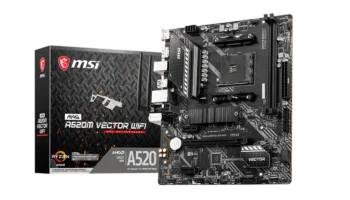
The MSI MAG A520M BAZOOKA WIFI is a feature-packed Micro-ATX motherboard designed to offer a balance of affordability and modern features. Built on the AMD A520 chipset, it supports a wide range of AMD Ryzen processors, making it a solid choice for both budget-conscious gamers and home users.
With built-in Wi-Fi, Bluetooth, and multiple expansion options, it offers excellent connectivity for users who want a compact yet powerful motherboard.
Key Features and Specifications
- Socket: AMD Socket AM4
- Chipset: AMD A520
- Memory Channels: Dual-channel
- DIMM Slots: 4 slots, supporting up to 128GB of DDR4 RAM
- PCI-E Slots: 1 PCI-E 3.0 x16 slot (for a graphics card), 2 PCI-E 3.0 x1 slots (for expansion cards)
- Storage: 4 SATAIII ports (6Gbps) for HDDs/SSDs, 1 M.2 slot (PCIe 3.0 x4 and SATA support)
- RAID: Supports RAID 0, 1, and 10 for SATA devices
- USB Ports: Front: 2 USB 3.2 Gen 1 Type-A ports, 4 USB 2.0 ports, Rear: 4 USB 3.2 Gen 1 Type-A ports, 2 USB 2.0 ports
- Audio: Realtek® ALC897 codec supporting 7.1-channel audio
- Video Outputs: 1 HDMI 1.4 port (supports 4K @ 60Hz), 1 DisplayPort (supports 4K @ 60Hz)
- CPU Support: Compatible with AMD Ryzen 5000, 4000G, and 3000 Series processors
- Form Factor: Micro-ATX (mATX)
Compatibility and Performance
CPU Compatibility
The MSI MAG A520M BAZOOKA WIFI is a versatile Micro-ATX motherboard designed for AMD’s AM4 socket processors. Powered by the A520 chipset, it supports a range of AMD Ryzen CPUs, making it suitable for budget-friendly builds as well as mid-range systems with respectable performance capabilities.
The motherboard is an excellent choice for users looking to build a gaming, productivity, or general-purpose PC while keeping their budget in check.
Recommended Processors
The choice of processor depends on your specific use case, from gaming and productivity to general tasks:
- Best for Gaming: Ryzen 5 5600G (₱7,200 – ₱9,000)
- Cores/Threads: 6/12
- Base/Boost Clock: 3.9 GHz / 4.4 GHz
- Why Choose It: This CPU combines strong multi-core performance with integrated Radeon Vega 7 graphics, making it perfect for gaming without a discrete GPU. It’s a great all-rounder for budget-friendly setups.
- Best for High-Performance Gaming: Ryzen 7 5700G (₱10,200 – ₱13,300)
- Cores/Threads: 8/16
- Base/Boost Clock: 3.8 GHz / 4.6 GHz
- Why Choose It: Ideal for users who want superior performance for gaming, video editing, and heavy multitasking. Its integrated Vega 8 graphics provide flexibility for GPU-free builds.
- Budget-Friendly Choice: Ryzen 3 4100 (₱4,150 – ₱5,100)
- Cores/Threads: 4/8
- Base/Boost Clock: 3.8 GHz / 4.0 GHz
- Why Choose It: An excellent option for budget-conscious users who need reliable performance for everyday tasks and casual gaming, especially when paired with a discrete GPU.
- Best Value for Dedicated GPUs: Ryzen 5 5500 (₱5,350 – ₱6,650)
- Cores/Threads: 6/12
- Base/Boost Clock: 3.6 GHz / 4.2 GHz
- Why Choose It: This CPU delivers smooth performance and pairs well with mid-range GPUs, making it ideal for gaming or multitasking builds.
- Entry-Level APU: Ryzen 5 4600G (₱6,250)
- Cores/Threads: 6/12
- Base/Boost Clock: 3.7 GHz / 4.2 GHz
- Why Choose It: Offers balanced performance with Radeon Vega graphics, making it suitable for casual gaming and home office setups without needing a dedicated GPU.
Memory Compatibility
With 4 DIMM slots supporting up to 128GB of DDR4 RAM, this motherboard is capable of handling multitasking, gaming, and productivity tasks. It supports memory speeds of up to 3200 MHz (JEDEC) with further overclocking capabilities reaching 4400+ MHz using A-XMP OC Mode.
This is more than enough for most gaming or professional workloads, ensuring fast and responsive performance.
Graphics Compatibility
The PCIe 3.0 x16 slot allows users to install a powerful discrete graphics card for gaming, rendering, or design tasks. For those using a Ryzen APU with integrated graphics, the board includes both an HDMI and a DisplayPort, supporting up to 4K @ 60Hz output. This makes it perfect for home theater setups, office workstations, or basic gaming without the need for a dedicated GPU.
Storage
Storage options on the MAG A520M BAZOOKA WIFI include:
- 4 SATAIII ports for traditional hard drives or SSDs
- 1 M.2 slot supporting PCIe 3.0 x 4 for ultra-fast NVMe SSDs
This setup provides ample flexibility for both high-speed storage (NVMe) and large-capacity SATA drives, making it suitable for a wide range of users, from gamers to professionals needing ample storage.
Expansion and Connectivity
PCIe and Expansion
The MSI MAG A520M BAZOOKA WIFI provides 1 PCIe 3.0 x16 slot for a discrete GPU and 2 PCIe 3.0 x1 slots for additional expansion cards such as Wi-Fi adapters, sound cards, or extra USB ports. This configuration allows for a flexible, compact build with room for future upgrades.
USB and Connectivity
The board offers a variety of USB options:
- 4 USB 3.2 Gen 1 ports on the rear panel for fast data transfer
- 2 USB 3.2 Gen 1 ports on the front, along with 4 USB 2.0 ports for peripherals
For networking, the motherboard comes with Gigabit Ethernet via the Realtek RTL8111H LAN controller. In addition, the board includes built-in Wi-Fi using the Intel Dual Band Wireless-AC 3168 module, supporting Wi-Fi 5 (802.11ac) and Bluetooth 4.2. This provides excellent wireless connectivity for both internet and Bluetooth peripherals like wireless headphones or controllers.
Audio and Networking
The Realtek ALC897 codec delivers 7.1-channel HD audio, providing clear and immersive sound, whether you’re gaming, watching movies, or listening to music. The inclusion of built-in Wi-Fi and Bluetooth is a huge plus for users who prefer a wireless setup without needing extra adapters.
Power, Cooling, and Overclocking
As expected from the A520 chipset, the MAG A520M BAZOOKA WIFI does not support overclocking for CPUs. However, it is well-equipped for stable, reliable stock performance. Power delivery comes from the 24-pin ATX main power connector and the 8-pin ATX 12V power connector, ensuring sufficient power for mid-range Ryzen CPUs.
In terms of cooling, the board includes:
1 CPU fan header
2 system fan headers
This setup is more than sufficient for a standard build, although users planning more intensive setups with multiple fans or liquid cooling may find the limited fan headers restrictive.
Pricing and Availability
The MSI MAG A520M BAZOOKA WIFI is priced around PHP 5,500 (approximately $96), making it an affordable option for gamers or professionals looking for a motherboard with built-in Wi-Fi and solid overall features.
This price point is competitive, especially considering the inclusion of wireless connectivity and modern features like the M.2 slot for NVMe storage.
Pros and Cons
Pros
- Built-in Wi-Fi and Bluetooth: No need for additional adapters, which is a huge convenience for wireless setups.
- Supports Ryzen 5000 processors: Future-proof for users wanting the latest AMD CPUs.
- Ample storage options: Includes both M.2 PCIe x4 support and 4 SATA ports for flexible storage setups.
- Multiple USB 3.2 ports: Great for connecting high-speed peripherals.
- High memory capacity: Supports up to 128GB of RAM, which is impressive for a Micro-ATX board.
- Compact form factor: Fits into smaller cases while still offering robust features.
Cons
- No overclocking support: Limited by the A520 chipset, so it’s not ideal for enthusiasts looking to tweak performance.
- Limited fan headers: Only 3 fan headers could be restrictive for users with more complex cooling setups.
- Only one PCIe x16 slot: Lacks support for dual GPU setups or additional high-bandwidth PCIe cards.
Who Should Buy the MSI MAG A520M BAZOOKA WIFI?
The MSI MAG A520M BAZOOKA WIFI is perfect for:
- Budget-conscious gamers looking for a motherboard that supports Ryzen 5000 series processors and has built-in Wi-Fi and Bluetooth.
- Home and office users who need a reliable motherboard with excellent wireless connectivity and flexible storage options.
- First-time builders or those who prefer a compact Micro-ATX build with room for moderate upgrades.
Final Verdict
At PHP 5,500 (~$96), the MSI MAG A520M BAZOOKA WIFI offers an excellent balance of price and performance, making it a fantastic choice for both gamers and home users. With Wi-Fi 5, Bluetooth, support for Ryzen 5000 series CPUs, and flexible storage options, it’s a great investment for anyone building a compact, reliable PC.
While it lacks overclocking support and advanced cooling options, it provides more than enough features for most users at a very competitive price.
How to Download MSI MAG A520M BAZOOKA WIFI Driver and BIOS Update
To download the latest drivers and BIOS for the MSI MAG A520M BAZOOKA WIFI, visit the official MSI Support page. Search for your motherboard model and select your operating system (e.g., Windows 10 or Windows 11 64-bit) under the Drivers & Downloads section. Download essential drivers such as chipset, LAN, Wi-Fi, and audio to ensure optimal functionality of your system.
For a BIOS update, download the latest version and save it to a FAT32-formatted USB drive. Restart your PC, and during startup, press the Delete key to enter the BIOS menu. Navigate to M-Flash, select the BIOS file from your USB drive, and follow the on-screen instructions to complete the update. Ensure that your PC remains powered on throughout the process, as it will reboot automatically once the update is complete.
Visit the MSI Support page to download all necessary drivers and BIOS updates for your MSI MAG A520M BAZOOKA WIFI motherboard.