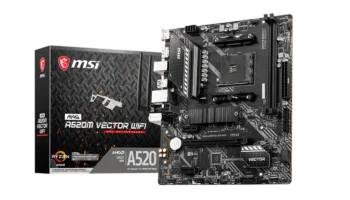
The MSI PRO B550M-A PRO is a budget-friendly Micro-ATX motherboard, designed to provide solid performance for everyday users, gamers, and content creators who need a compact and reliable system. Despite its smaller form factor, it packs plenty of essential features, such as PCIe 4.0 support, decent connectivity, and robust memory support, making it a great option for entry-level builds.
With a price of around PHP 5,600 (~$100 USD), it strikes a balance between affordability and functionality, catering to users who want to build a Ryzen-powered system.

Key Features and Specifications
- Motherboard Model: MSI PRO B550M-A PRO
- Socket: AMD AM4
- Chipset: AMD B550
- Memory Channels: Dual
- DIMM Slots: 2, supporting up to 64GB of DDR4 memory
- PCI-E Slots: 1x PCIe 4.0/3.0 x16 slot (for a graphics card or other high-bandwidth device), 1x PCIe 3.0 x1 slot (for peripherals)
- Storage: 4x SATA III ports for HDDs and SSDs, 1x M.2 slot (supports both PCIe 4.0/3.0 and SATA storage)
- USB Ports: Front: 2x USB 3.2 Gen 1, 6x USB 2.0
- Rear: 4x USB 3.2 Gen 1 Type-A, 2x USB 2.0
- Networking: Realtek® RTL8111H Gigabit LAN
- Audio: Realtek® ALC892/ALC897 Codec, 7.1-Channel HD Audio
- Display Outputs: HDMI 2.1 (supports 4K @ 60Hz), DVI-D (supports up to 1920×1200 @ 60Hz)
- Form Factor: Micro-ATX (23.6 cm x 20 cm)
Performance and Compatibility
CPU Compatibility
The MSI PRO B550M-A PRO supports a wide range of AMD Ryzen processors, including the latest Ryzen 5000, 3000, and 4000 G-Series. It ensures that users have access to the most current CPUs, making it suitable for both gaming and productivity setups. However, note that it does not support older models like the Ryzen 5 3400G and Ryzen 3 3200G.
Memory Compatibility
The board comes with 2 DIMM slots, supporting up to 64GB of DDR4 memory. It handles memory speeds up to 4600 MHz when overclocked (A-XMP OC Mode), ensuring smooth multitasking and performance in games or heavy workloads. The dual-channel memory architecture provides better data throughput and improved overall performance.
Graphics Compatibility – expand
For users leveraging the AMD Ryzen G-Series processors with integrated graphics, the board supports:
Storage and Expansion
- HDMI 2.1 (up to 4K @ 60Hz), which is great for high-resolution displays or media setups.
- DVI-D for legacy monitors, which supports up to 1920×1200 @ 60Hz.
- This makes it versatile enough for basic productivity tasks, media consumption, and light gaming without a dedicated GPU.
The MSI PRO B550M-A PRO offers a solid storage configuration for a compact build:
- 4 SATA III ports (6Gbps) for traditional hard drives or SSDs.
- 1 M.2 slot, which supports PCIe 4.0 (up to 64Gbps), allowing ultra-fast NVMe SSDs for faster boot times and improved data transfer rates.
This is especially beneficial for gaming and large file transfers, providing the benefits of next-gen storage technology. While there is only one M.2 slot, it is ideal for most mainstream users who require fast storage but do not need multiple NVMe drives.
Connectivity and Ports
USB Connectivity
This motherboard features 2 USB 3.2 Gen 1 ports on the front, 4 on the rear, and a total of 6 USB 2.0 ports between the front and rear. This provides a wide range of options for connecting peripherals, external storage devices, and accessories, although the lack of USB 3.2 Gen 2 (10Gbps) is a slight drawback for users who need ultra-fast USB transfer speeds.
Audio and Networking
Audio
The motherboard is equipped with the Realtek ALC892/ALC897 Codec, supporting 7.1-channel audio. While this onboard audio is sufficient for most users, providing clear sound for gaming and media consumption, audiophiles or users looking for higher-quality sound might consider external audio solutions for better fidelity.
Networking
The Realtek® RTL8111H Gigabit LAN controller ensures stable wired internet connectivity. While the board lacks built-in Wi-Fi, users can add a Wi-Fi adapter via the PCIe slot or USB if needed.
Cooling and Power
Cooling Support
The MSI PRO B550M-A PRO comes with basic cooling options, including:
- 1x CPU fan header
- 1x system fan header
This provides just enough flexibility for basic air cooling setups. However, those looking to build a high-performance rig with multiple fans or water cooling systems may need to invest in fan hubs or splitters due to the limited number of fan headers.
Power Connectors
The board includes:
- 1x 24-pin ATX main power connector
- 1x 4-pin ATX 12V power connector, which is standard for most entry-level builds.
While sufficient for mainstream CPUs, the 4-pin connector may limit overclocking potential, especially when using high-end Ryzen processors.
Pricing and Where to buy it
Priced at PHP 5,600 (~$100 USD), the MSI PRO B550M-A PRO is a great option for users who need a reliable, entry-level motherboard with support for PCIe 4.0 and fast memory speeds. This is ideal for budget-conscious builders who don’t require the extra features of more expensive boards but still want access to the performance benefits of the B550 chipset.
Pros and Cons
Pros
- Affordable: A highly affordable option for builders on a budget.
- PCIe 4.0 support: Provides access to faster NVMe storage options.
- Dual M.2 support: Offers a modern storage solution for fast SSDs.
- Good display options: HDMI 2.1 with 4K @ 60Hz and DVI-D support for older monitors.
- Compact form factor: Micro-ATX size allows for smaller case compatibility.
Cons
- Limited PCIe slots: Only one PCIe 3.0 x1 slot, limiting expansion for additional cards.
- Lack of Wi-Fi: No built-in Wi-Fi, which may be inconvenient for users who need wireless connectivity.
- Basic cooling support: Limited fan headers might require additional fan hubs or splitters.
Who Should Buy the MSI PRO B550M-A PRO?
This motherboard is an excellent choice for:
- Budget-conscious builders: Those looking to create a Ryzen-based system with PCIe 4.0 support at an affordable price.
- Entry-level gamers: Gamers who want a basic setup with room for a single GPU and modern storage options.
- Office and productivity users: Ideal for users who need reliable performance and ample connectivity for day-to-day tasks, without the need for premium features.
Final Verdict
The MSI PRO B550M-A PRO offers a great balance of price and features for users building a budget or mid-range PC. While it lacks some premium features like Wi-Fi or more extensive expansion options, it delivers solid performance with PCIe 4.0 support, fast memory compatibility, and enough connectivity for most users.
It’s an excellent choice for anyone looking to build a Ryzen-based system without the need for high-end extras, making it a smart investment for entry-level builders or small form-factor enthusiasts.
How to Download MSI PRO B550M-A PRO Driver and BIOS Update
To download the latest drivers and BIOS for the MSI PRO B550M-A PRO Motherboard, visit the official MSI Support page. Search for your motherboard model, then select your operating system (e.g., Windows 10 or Windows 11 64-bit) under the Drivers & Downloads section. Download essential drivers such as chipset, LAN, and audio to ensure the proper functionality of your system.
For a BIOS update, download the latest version, save it to a FAT32-formatted USB drive, and restart your PC. During startup, press the Delete key to enter the BIOS menu and navigate to M-Flash. Select the BIOS file from the USB drive and follow the on-screen instructions to complete the update. Ensure that the PC remains powered on throughout the process, as it will reboot automatically after the update.
Visit the MSI Support page to download all necessary drivers and BIOS updates for your motherboard.