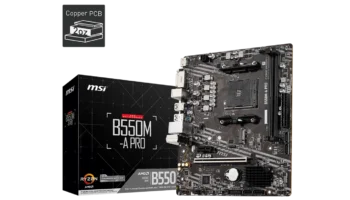
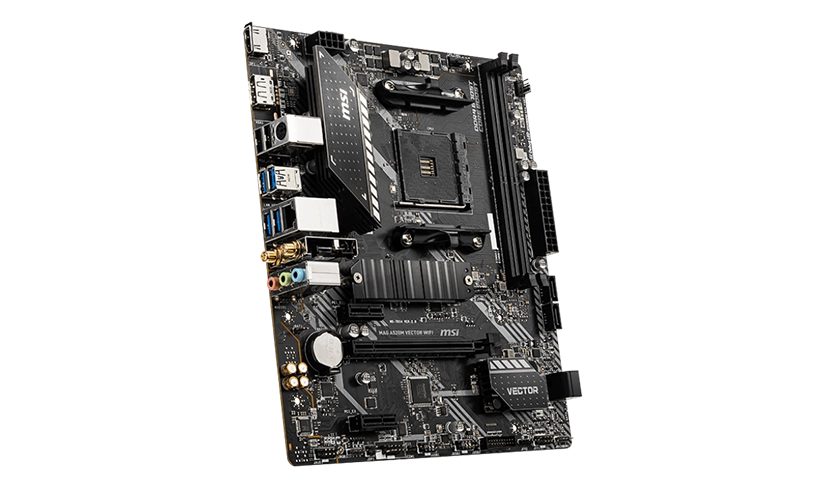
The MSI MAG A520M VECTOR WIFI is a versatile Micro-ATX motherboard built for AMD’s AM4 socket and powered by the AMD A520 chipset. This board is ideal for budget gamers, home office users, and even light content creators who need solid performance without breaking the bank.
With built-in Wi-Fi and Bluetooth, along with support for Ryzen 5000, 4000G, and 3000 series processors, it offers excellent value in a compact form factor.
Key Features and Specifications
- Motherboard Model: MSI MAG A520M VECTOR WIFI
- Socket: AMD Socket AM4
- Chipset: AMD A520
- Memory Channels: Dual-channel
- DIMM Slots: 2 slots, supporting up to 64GB of DDR4 RAM
- PCI-E Slots: 1 PCI-E 3.0 x16 slot (for a graphics card), 2 PCI-E 3.0 x1 slots (for expansion cards)
- Storage: 4 SATAIII ports (6Gbps) for HDDs/SSDs, 1 M.2 slot (PCIe 3.0 x4 and SATA support)
- RAID: Supports RAID 0, 1, and 10 for SATA devices
- USB Ports: Front: 2 USB 3.2 Gen 1 Type-A ports, 4 USB 2.0 ports, Rear: 4 USB 3.2 Gen 1 Type-A ports, 2 USB 2.0 ports
- Audio: Realtek® ALC892/ALC897 codec supporting 7.1-channel audio
- Video Outputs: 1 HDMI 2.1 port (supports 4K @ 60Hz), 1 DisplayPort 1.4 (supports 4K @ 60Hz)
- CPU Support: Compatible with AMD Ryzen 5000, 4000G, and 3000 Series processors
- Form Factor: Micro-ATX (mATX)
Compatibility and Performance
CPU Compatibility
The MSI MAG A520M VECTOR WIFI motherboard is built on AMD’s AM4 socket and powered by the A520 chipset, providing wide-ranging compatibility with various Ryzen processors. This makes it an excellent choice for budget to mid-range builds that demand reliability, efficiency, and wireless connectivity. Supporting processors across multiple Ryzen generations, the motherboard caters to gamers, content creators, and general users alike.
Supported Processor Series
AMD Ryzen 5000 Series (Zen 3)
Delivers top-tier performance for gaming, streaming, and productivity, with improved efficiency and powerful single-threaded and multi-threaded processing. Examples: Ryzen 5 5600G, Ryzen 7 5700G.
AMD Ryzen 4000G Series (Zen 2 APUs)
Perfect for users who need integrated graphics for systems without discrete GPUs. These processors offer great value for everyday tasks, light gaming, and media consumption. Examples: Ryzen 5 4600G, Ryzen 3 4300G.
AMD Ryzen 3000 Series (Zen 2)
Well-suited for cost-effective builds, providing stable performance for general computing and moderate gaming. Examples: Ryzen 5 3600, Ryzen 3 3100.
Memory Compatibility
With 2 DIMM slots supporting up to 64GB of DDR4 memory, this motherboard is capable of handling gaming, multitasking, and productivity tasks with ease. It supports memory speeds up to 3200 MHz (JEDEC) with overclocking options reaching 4600+ MHz through A-XMP OC Mode.
This ensures the board can accommodate both casual gamers and professionals looking for solid memory performance.
Graphics Compatibility
The PCIe 3.0 x16 slot allows for a discrete graphics card, making this board perfect for gamers or professionals who require graphical power. Additionally, for users relying on integrated graphics from Ryzen APUs, the HDMI 2.1 and DisplayPort 1.4 outputs support up to 4K @ 60Hz, providing flexibility for multi-monitor setups or home office configurations.
Storage
Storage is where the MAG A520M VECTOR WIFI shines for budget builders. It offers:
- 4 SATAIII ports for traditional SSDs or HDDs
- 1 M.2 slot for fast NVMe SSDs
The M.2 slot supports PCIe 3.0 x4 and SATA, allowing for high-speed storage options to ensure faster boot times and application loading. Whether you’re gaming or working on large files, this setup can handle it.
Expansion and Connectivity
PCIe and Expansion
The MSI MAG A520M VECTOR WIFI includes 1 PCIe 3.0 x16 slot and 2 PCIe 3.0 x1 slots for expansion. This allows for the installation of a powerful GPU and additional expansion cards like sound cards, USB hubs, or Wi-Fi adapters.
However, since it already has built-in Wi-Fi and Bluetooth, most users won’t need to fill these slots immediately, leaving room for future upgrades.
USB and Connectivity
The motherboard provides plenty of USB connectivity, including:
- 4 USB 3.2 Gen 1 ports on the rear panel
- 2 USB 3.2 Gen 1 ports on the front panel
- 6 USB 2.0 ports (4 front, 2 rear) for legacy peripherals
In addition to its USB connectivity, the Realtek RTL8111H LAN controller provides reliable Gigabit Ethernet. The board also comes with Wi-Fi 5 (802.11ac) support via the Intel Dual Band Wireless-AC 3168, providing speeds of up to 433 Mbps on dual-band networks. Bluetooth 4.2 is also included, making it easier to connect wireless peripherals.
Audio and Networking
The Realtek ALC892/ALC897 audio codec delivers 7.1-channel high-definition audio, which is more than adequate for gaming, media consumption, or voice communication. Paired with Wi-Fi 5 and Bluetooth 4.2, this board is ideal for those seeking a wireless setup for their PC, eliminating the need for additional adapters.
Power, Cooling, and Overclocking
The MSI MAG A520M VECTOR WIFI is optimized for stock performance, with no overclocking support, which is typical of the A520 chipset. Power delivery is handled by a 24-pin ATX main power connector and an 8-pin CPU power connector, providing stable power for Ryzen 5000 processors at stock speeds.
Cooling options include:
- 1 CPU fan header
- 1 system fan header
While the cooling is adequate for most users, those with more complex cooling setups may find the limited fan headers restrictive. Still, for budget and moderate gaming builds, this should be more than sufficient.
Pricing and Availability
The MSI MAG A520M VECTOR WIFI is priced at around ₱5,000 (approximately $87), making it a very affordable option for users looking to build a budget gaming or office PC with modern features like Wi-Fi 5 and Bluetooth.
It provides excellent value for its price, especially considering its future-proof support for Ryzen 5000 series processors.
Pros and Cons
Pros
- Built-in Wi-Fi and Bluetooth: Saves money on additional adapters, providing wireless connectivity out of the box.
- Supports Ryzen 5000 processors: Future-proof for those wanting the latest AMD CPUs.
- Ample storage options: Includes 1 M.2 slot and 4 SATA ports, ensuring flexible storage configurations.
- Plenty of USB ports: Offers multiple USB 3.2 Gen 1 ports for high-speed data transfer.
- Compact Micro-ATX form factor: Fits well in smaller cases, making it ideal for compact builds.
Cons
- No overclocking support: Limited by the A520 chipset, which might be a drawback for enthusiasts.
- Limited fan headers: Only 2 fan headers may not be enough for advanced cooling setups.
- Only 1 PCIe x16 slot: Not suitable for multi-GPU setups or users needing multiple PCIe expansion cards.
Who Should Buy the MSI MAG A520M VECTOR WIFI?
The MSI MAG A520M VECTOR WIFI is ideal for:
- Budget gamers or home users looking for a cost-effective motherboard with Wi-Fi and Bluetooth.
- Office workers or content creators who need a reliable, compact motherboard with enough power to handle Ryzen processors.
- First-time builders or those with smaller cases, who want a simple but capable motherboard for a variety of tasks.
Final Verdict
At PHP 5,000 (~$87), the MSI MAG A520M VECTOR WIFI is an excellent budget-friendly motherboard that delivers essential features for gaming, productivity, and everyday tasks. Its built-in Wi-Fi and Bluetooth make it a convenient choice for users looking for wireless connectivity, while support for Ryzen 5000 series processors ensures it’s a solid investment for future-proofing.
With flexible storage options and plenty of USB ports, it’s a great choice for both budget builders and experienced users looking to build a compact and efficient system.
How to Download MSI MAG A520M VECTOR WIFI Driver and BIOS Update
To download the latest drivers and BIOS for the MSI MAG A520M VECTOR WIFI, visit the official MSI Support page. Search for your motherboard model and select your operating system (e.g., Windows 10 or Windows 11 64-bit) under the Drivers & Downloads section. Download essential drivers such as chipset, LAN, Wi-Fi, and audio to ensure optimal functionality of your system.
For a BIOS update, download the latest version and save it to a FAT32-formatted USB drive. Restart your PC, and during startup, press the Delete key to enter the BIOS menu. Navigate to M-Flash, select the BIOS file from your USB drive, and follow the on-screen instructions to complete the update. Ensure that your PC remains powered on throughout the process, as it will reboot automatically once the update is complete.
Visit the MSI Support page to download all necessary drivers and BIOS updates for your MSI MAG A520M VECTOR WIFI motherboard.