The MSI PRO B650-P WIFI is a high-value, mid-range motherboard designed for AMD Ryzen 7000, 8000, and 9000 series processors. With its AM5 socket, DDR5 support, Wi-Fi 6E, and efficient design, this board is well-suited for gaming, productivity, and multitasking-focused builds.
This review will explore the key features, compatibility, and performance to help you determine if this board is the right choice for your next build.
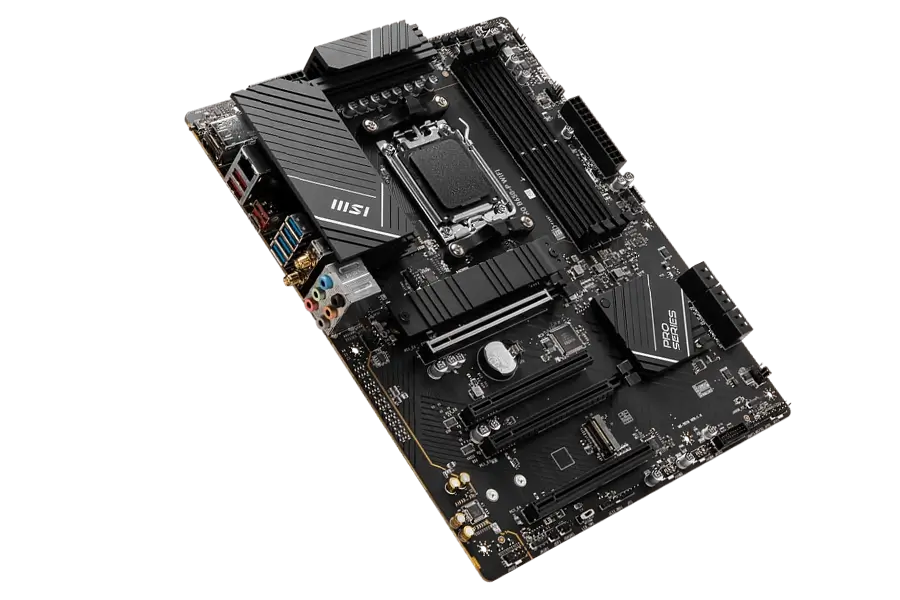
Key Features and Specifications
- Motherboard Model: MSI PRO B650-P WIFI
- Socket: AM5
- Chipset: AMD B650
- Memory Support: 4x DDR5 DIMM slots, up to 256GB, with overclocking up to 7200MHz+
- PCI-E Slots: 2x PCIe x16 slots (PCIe 4.0 x16 from CPU, PCIe 4.0 x4 from chipset)
- 1x PCIe x1 slot for additional expansion cards
- Storage Options: 2x M.2 slots (PCIe 4.0 x4) for ultra-fast NVMe SSDs
- 4x SATA 6G ports for traditional storage options
- USB Ports: Rear: 4x USB 5Gbps Type-A, 3x USB 10Gbps Type-A, 1x USB 20Gbps Type-C
- Front: 4x USB 2.0, 2x USB 5Gbps Type-A, 1x USB 10Gbps Type-C
- Networking: Realtek 2.5G LAN for wired connections
- Wi-Fi 6E and Bluetooth 5.3 for advanced wireless connectivity
- Audio: Realtek ALC897 Codec, 7.1-Channel High Definition Audio
- Video Output: HDMI 2.1 and DisplayPort 1.4 for integrated graphics support
- Form Factor: ATX (243.84mm x 304.8mm)
CPU Compatibility
The MSI PRO B650-P WIFI is designed to support a broad range of AMD’s Ryzen processors, including the latest 7000, 8000, and future 9000 series. This compatibility ensures that users can leverage the cutting-edge performance and efficiency offered by AMD’s newest chips.
Whether you’re building a system for gaming, content creation, or intensive computing tasks, this motherboard offers the versatility to accommodate the latest high-performance CPUs.
Processor Recommendations
- AMD Ryzen 5 7600X: An excellent option for those who want strong performance on a more modest budget.
- AMD Ryzen 7 7700X: This processor is a great choice for users who need robust performance for gaming and multitasking.
Memory Compatibility
With 4 DDR5 DIMM slots, the board supports up to 256GB of DDR5 memory at overclocking speeds reaching 7200MHz. This high memory bandwidth is ideal for intensive applications, such as high-resolution gaming, media editing, and multitasking.
The AMD EXPO profile support also allows for streamlined overclocking, enabling users to enhance memory speeds easily. DDR5’s increased efficiency and bandwidth help ensure a smooth experience in demanding scenarios, making it an excellent choice for performance-focused users.
Graphics Compatibility
With dual PCIe x16 slots supporting PCIe 4.0, the MSI PRO B650-P WIFI is capable of running powerful graphics cards in both single and dual configurations. This feature allows for significant flexibility in building high-performance systems capable of running the latest games and professional applications at peak efficiency.
GPU Recommendations:
- NVIDIA RTX 4070 or RTX 4080: Ideal for users requiring the best visual performance for ultra-high-resolution gaming or intensive graphic design and video editing tasks.
- NVIDIA RTX 3060 or RTX 4060: These GPUs offer fantastic performance for gamers and creators alike, providing a good balance between cost and capability.
Storage and Expansion
The MSI PRO B650-P WIFI includes 2x M.2 slots (PCIe 4.0 x4) and 4x SATA 6G ports for diverse storage options. The M.2 slots support NVMe SSDs, offering blazing-fast read and write speeds, ideal for quick boot times and fast file access.
The SATA ports provide additional storage expansion for traditional SSDs or HDDs, and the board supports RAID 0, RAID 1, and RAID 10 for both M.2 and SATA devices, allowing users to balance performance and redundancy based on their storage needs.
Power and Cooling
The MSI PRO B650-P WIFI includes comprehensive options for cooling and power supply management, ensuring that systems built with this motherboard can maintain optimal performance without overheating.
The motherboard’s support for multiple fan headers and robust power delivery accommodates high-performance components effortlessly.
Power Supply Recommendations:
- 650 Watts PSU: Suitable for mid-range systems, providing reliable power and efficiency.
- 850 Watts PSU: A must-have for high-end builds, especially when using top-tier GPUs.
Cooling Recommendations:
- Corsair H100i RGB Platinum: A top choice for effective CPU cooling, especially if you’re planning to overclock.
- Noctua NF-F12 or Corsair LL120: These fans are excellent for enhancing airflow and keeping system temperatures low, particularly in high-load scenarios.
By understanding the capabilities and requirements of the MSI PRO B650-P WIFI, you can make informed decisions about the components that best suit your needs, ensuring a stable and powerful PC build.
Connectivity and Networking
The MSI PRO B650-P WIFI provides extensive connectivity, featuring USB 20Gbps Type-C for fast data transfers and multiple USB 10Gbps and 5Gbps Type-A ports for peripherals. Wired networking is powered by Realtek 2.5G LAN, offering fast and stable connections.
The Wi-Fi 6E and Bluetooth 5.3 ensure reliable wireless performance for gaming, streaming, and remote work.
Pricing and Availability
The MSI PRO B650-P WIFI motherboard provides excellent value for its price, offering a range of high-end features on the AMD AM5 platform at a budget-friendly cost. Priced between PHP 8,000 and PHP 9,000 (approximately USD 140–160), it’s an affordable option for those looking to build or upgrade their PC without compromising on quality or performance.
Where to Buy: This motherboard is widely available online and can be purchased through major e-commerce platforms such as Lazada, Shopee, and Amazon. Its broad availability ensures that you can easily find and purchase this model, regardless of your location within the Philippines or internationally.
Look for Deals: Keep an eye out for regular promotions and discounts offered by these retailers, which can make the MSI PRO B650-P WIFI even more economical. By taking advantage of these deals, you can potentially save on your purchase, making this motherboard a great choice for budget-conscious PC builders who do not want to sacrifice performance for price.
Shop Now:
- Buy on Amazon – For international buyers, Amazon offers a wide selection and easy shipping options for the MSI PRO B650-P WIFI.
- Buy on Lazada – Explore deals and purchase the MSI PRO B650-P WIFI directly from Lazada for fast and reliable shipping.
- Buy on Shopee – Check out Shopee for competitive prices and great offers on the MSI PRO B650-P WIFI.
Pros and Cons
Pros
- Future-Proofed with AM5 Socket: Compatible with AMD Ryzen 7000, 8000, and 9000 series processors.
- High-Speed DDR5 Memory Support: Up to 256GB with overclocking to 7200MHz.
- Versatile Connectivity: Wi-Fi 6E, Bluetooth 5.3, and USB 20Gbps Type-C.
- Ample Cooling Options: 1 pump fan header and 4 system fan headers for improved airflow.
Cons
- No PCIe 5.0: PCIe 4.0 is robust for most users, but PCIe 5.0 would offer more future-proofing.
- Basic Audio Codec: The Realtek ALC897 is sufficient but may not satisfy users needing advanced audio fidelity.
Who Should Use the MSI PRO B650-P WIFI?
This motherboard is an ideal choice for mid-range gamers, multitaskers, and productivity enthusiasts looking to build a powerful yet cost-effective system. With support for DDR5, Wi-Fi 6E, and high-speed storage, this board provides the essential features for demanding applications without the premium price of higher-end boards.
Final Verdict
The MSI PRO B650-P WIFI delivers solid performance, future-ready features, and versatile connectivity, making it an excellent choice for mid-range gaming or productivity setups. With DDR5 support, PCIe 4.0, and Wi-Fi 6E.
How to Download MSI PRO B650-P WIFI Drivers & Bios Update
To download the latest drivers and BIOS for the MSI PRO B650-P WIFI visit the official MSI Support page. Search for your motherboard model, then select your operating system (e.g. Windows 10, or Windows 11 64-bit) under the Drivers & Downloads section. Download essential drivers such as chipset, LAN, and audio to ensure proper functionality of your system.
For a BIOS update, download the latest version, save it to a FAT32-formatted USB drive, and restart your PC. During startup, press the Delete key to enter the BIOS menu and navigate to M-Flash. Select the BIOS file from the USB drive and follow the on-screen instructions to complete the update. Ensure that the PC remains powered on throughout the process, as it will reboot automatically after the update.
Visit the MSI Support page to download all necessary drivers and BIOS updates for your motherboard.