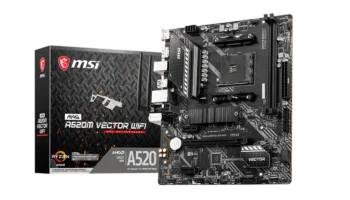
The MSI B450 GAMING PRO CARBON MAX WIFI is a premium ATX motherboard built for gamers and PC enthusiasts looking for solid performance, stylish design, and a range of advanced features. It supports a wide range of AMD processors, including the Ryzen 1st, 2nd, and 3rd Gen chips, and comes equipped with Wi-Fi, Bluetooth, and high-speed storage options.
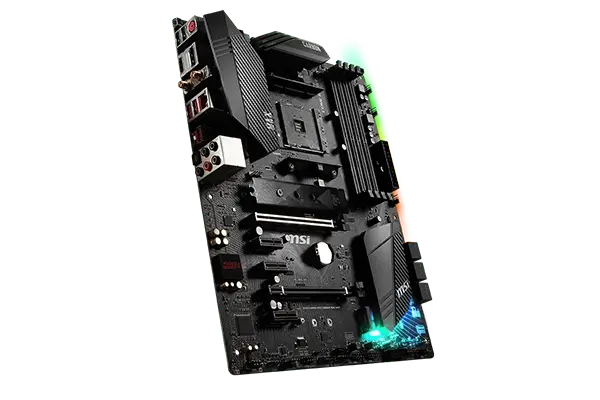


This board is part of MSI’s Carbon series, known for its high-end aesthetics and solid gaming performance.
Key Features and Specifications
- Motherboard Model: MSI B450 GAMING PRO CARBON MAX WIFI
- Socket: AM4
- Chipset: AMD B450
- Form Factor: ATX
- Memory: 4x DDR4 DIMM slots, up to 128GB, speeds up to 4133 MHz (OC).
- Storage: 2x M.2 slots, 6x SATA III 6Gbps ports.
- PCIe Slots: 2x PCIe x16, 3x PCIe x1.
- USB Ports: 1x USB 3.2 Gen2 Type-C, 1x USB 3.2 Gen2 Type-A, 2x USB 3.2 Gen1, 6x USB 2.0.
- Networking: Intel® Dual Band Wireless-AC 9260 (Wi-Fi & Bluetooth 5.0), Intel® I211AT Gigabit LAN.
- Audio: Realtek® ALC1220 Codec, 7.1-Channel HD Audio with Optical S/PDIF.
- Multi-GPU: Supports 2-Way AMD® CrossFire™ Technology.
Compatibility and Performance
CPU Compatibility
The MSI B450 GAMING PRO CARBON MAX WIFI supports 1st, 2nd, and 3rd generation AMD Ryzen processors, including those with integrated Radeon Vega Graphics (like Ryzen 5 3400G) and Athlon™ processors. This motherboard is highly versatile, whether you’re building an entry-level gaming rig with an Athlon CPU or a powerful machine with a Ryzen 9 CPU for high-end gaming or content creation.
Since it uses the AM4 socket, it offers long-term compatibility with AMD processors. While designed primarily for the Ryzen 3000 series, it can also support the Ryzen 5000 series CPUs with a BIOS update, making it a great option for future upgrades.
Memory Support
The motherboard features 4x DDR4 DIMM slots that support up to 128GB of memory. It supports JEDEC standard speeds up to 2667 MHz and allows overclocking up to 4133 MHz via A-XMP OC MODE. This high memory capacity and overclocking potential make it suitable for multitasking, content creation, and gaming.
Whether you’re gaming or running memory-heavy applications like video editing software, the B450 GAMING PRO CARBON MAX WIFI can handle it.
PCIe Slots and Graphics
For expansion, the board includes:
- 2x PCIe x16 slots, which support PCIe 3.0 x16 for the first slot (ideal for GPUs) and PCIe 2.0 x4 for the second slot.
- 3x PCIe x1 slots for additional peripherals like sound cards, network adapters, or capture cards.
The motherboard supports 2-Way AMD CrossFire technology, allowing gamers to run multiple AMD GPUs in tandem for increased performance in games that support multi-GPU setups. While it lacks NVIDIA SLI support, it is still a great option for AMD enthusiasts looking to use dual GPUs.
Storage and Expansion
In terms of storage, the board offers great flexibility:
- 2x M.2 slots for ultra-fast NVMe PCIe SSDs:
- The M2_1 slot (from the CPU) supports PCIe 3.0 x4 and SATA 6Gbps, providing maximum storage performance.
- The M2_2 slot (from the chipset) supports PCIe 2.0 x4 devices.
- 6x SATA III 6Gbps ports, allowing for large storage setups or RAID configurations.
For users with a focus on speed, the NVMe SSD support in RAID 0 and 1 offers blazing-fast storage speeds for boot drives or gaming libraries.
Connectivity: Wi-Fi, LAN, and Bluetooth
One of the standout features of the MSI B450 GAMING PRO CARBON MAX WIFI is its built-in Wi-Fi and Bluetooth:
Network Connection
For wired networking, the motherboard uses the Intel® I211AT Gigabit LAN controller, ensuring stable and fast internet connections for competitive gaming or streaming.
The Intel® Dual Band Wireless-AC 9260 module supports Wi-Fi 5 (802.11ac) with speeds up to 1.73 Gbps, perfect for gaming, streaming, or downloading large files without the need for a wired connection.
Bluetooth
Bluetooth 5.0 is included, providing wireless connectivity for peripherals like headphones, keyboards, or controllers.
Audio: High-Definition Sound
The Realtek® ALC1220 codec delivers 7.1-channel HD audio with support for S/PDIF optical output, providing high-quality sound for gamers and audiophiles alike.
The ALC1220 is a premium audio codec that delivers clearer sound, lower noise, and a better overall experience than standard onboard audio solutions. Paired with Nahimic 3 software, users can tweak their audio settings for the best sound quality.
USB and External Ports
The B450 GAMING PRO CARBON MAX WIFI offers an extensive array of USB ports:
- USB 3.2 Gen2: 1x Type-C and 1x Type-A port on the rear panel for high-speed 10Gbps transfers.
- USB 3.2 Gen1: 2x Type-A ports on the rear and 2 additional ports via internal connectors.
- USB 2.0: 6x USB 2.0 ports (2 on the rear and 4 via internal connectors).
- This variety of ports makes the motherboard well-suited for those with multiple peripherals, such as gaming mice, external storage, or VR setups.
Aesthetics and RGB Customization
The MSI B450 GAMING PRO CARBON MAX WIFI features an eye-catching design with Carbon-fiber elements and customizable RGB lighting. It includes:
- 2x 5050 RGB LED connectors.
- 1x Addressable RGB (ARGB) connector.
- 1x CORSAIR connector for use with CORSAIR RGB lighting systems.
- With the Mystic Light software, you can synchronize the RGB lighting with other compatible components in your build, allowing for a truly personalized look.
Pricing and Where to Buy
Brand-new units for the MSI B450 GAMING PRO CARBON MAX WIFI typically retail around PHP 8500 to PHP 10,000 (approximately $150 – $190 USD), depending on availability and store pricing.
Pros and Cons
Pros
- Built-in Wi-Fi 5 and Bluetooth 5.0, eliminating the need for external adapters.
- High-quality audio with Realtek ALC1220 codec and S/PDIF support.
- Support for 2-Way AMD CrossFire for multi-GPU setups.
- Dual M.2 slots with NVMe support for ultra-fast storage.
- Extensive connectivity: USB 3.2 Gen2, Type-C, multiple USB ports.
- Customizable RGB lighting with Mystic Light software.
Cons
- No support for NVIDIA SLI, limiting multi-GPU options for NVIDIA cards.
- Limited PCIe lane availability when using both M.2 slots.
- Pricey for refurbished units compared to brand-new alternatives.
Video: MSI B450 GAMING PRO CARBON MAX WIFI Unboxing
Who Should Buy the MSI B450 GAMING PRO CARBON MAX WIFI?
This motherboard is ideal for:
- Gamers looking for high performance, solid connectivity, and Wi-Fi in a stylish ATX motherboard.
- Enthusiasts who want to overclock their Ryzen CPUs and maximize their system’s potential.
- Streamers and content creators who need multiple high-speed USB ports and strong wireless performance.
- RGB lovers who enjoy customizing their PC’s lighting to match their setup.
Final Verdict
The MSI B450 GAMING PRO CARBON MAX WIFI is a feature-packed motherboard offering excellent value for gamers, streamers, and PC enthusiasts. It combines great performance with advanced connectivity options like Wi-Fi 5, Bluetooth 5.0, and high-speed M.2 storage.
While it lacks NVIDIA SLI support, it excels in other areas like audio quality and RGB customization. Overall, this motherboard is a solid choice for anyone building a high-performance gaming PC with an AMD Ryzen processor.
How to Download MSI B450 GAMING PRO CARBON MAX WIFI Driver and Bios Update
To download the latest drivers and BIOS for the MSI B450 GAMING PRO CARBON MAX WIFI visit the official MSI Support page. Search for your motherboard model, then select your operating system (e.g. Windows 10, or Windows 11 64-bit) under the Drivers & Downloads section. Download essential drivers such as chipset, LAN, and audio to ensure proper functionality of your system.
For a BIOS update, download the latest version, save it to a FAT32-formatted USB drive, and restart your PC. During startup, press the Delete key to enter the BIOS menu and navigate to M-Flash. Select the BIOS file from the USB drive and follow the on-screen instructions to complete the update. Ensure that the PC remains powered on throughout the process, as it will reboot automatically after the update.
Visit the MSI Support page to download all necessary drivers and BIOS updates for your motherboard.