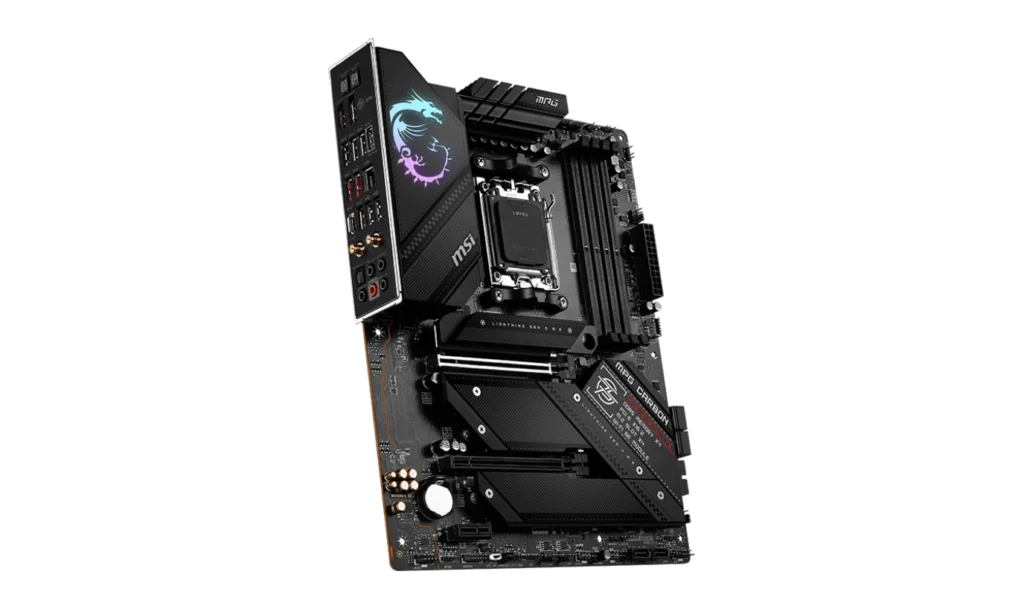
The MSI MPG B650 CARBON WIFI is a premium ATX motherboard designed for high-performance gaming and productivity builds. With its AMD B650 chipset and AM5 socket, it supports the latest AMD Ryzen 7000, 8000, and 9000 series processors, making it a future-proof choice for enthusiasts and power users.
Packed with advanced features like PCIe 5.0 storage, DDR5 memory, and Wi-Fi 6E, the MPG B650 CARBON WIFI delivers top-tier performance for demanding applications, including 4K gaming, video editing, and heavy multitasking.
Key Features
- Motherboard: MSI MPG B650 CARBON WIF
- Socket: AM5
- Chipset: AMD B650
- Memory Support: 4x DDR5 DIMM slots, up to 256GB. Overclocking speeds up to 6600MHz (OC)
- PCI-E Slots: 2x PCIe x16, (1x PCIe 4.0 x16, 1x PCIe 4.0 x4)
- Storage Options: 3x M.2 slots (1x PCIe 5.0 x4, 2x PCIe 4.0 x4), 6x SATA 6G ports for HDDs and SSDs
- Networking: Realtek 2.5G LAN, AMD Wi-Fi 6E and Bluetooth 5.3
- Audio: Realtek ALC4080 Codec with 7.1-Channel High-Definition Audio
- Video Output: HDMI 2.1 (4K at 60Hz) and DisplayPort 1.4 (8K at 60Hz)
- Form Factor: ATX (243.84mm x 304.8mm)
Compatibility and Performance
CPU Compatibility
The MSI MPG B650 CARBON WIFI supports AMD Ryzen processors from the 7000, 8000, and 9000 series, making it ideal for users seeking cutting-edge performance. Its AM5 socket ensures compatibility with the latest multi-core CPUs, providing outstanding speed for gaming, rendering, and multitasking.
Memory Compatibility
With 4 DDR5 DIMM slots, this motherboard supports up to 256GB of DDR5 RAM at speeds of up to 6600MHz. The high memory bandwidth ensures smooth performance for gaming, 3D modeling, and video editing.
AMD EXPO simplifies memory overclocking, allowing users to push their system to the limits with minimal effort.
Graphics Compatibility
Equipped with 2 PCIe x16 slots, the MPG B650 CARBON WIFI is capable of supporting high-performance GPUs like the NVIDIA RTX 4080 or AMD RX 7900 XT, making it a perfect choice for gaming at 4K resolutions or rendering complex projects.
For those using integrated graphics, the HDMI 2.1 and DisplayPort 1.4 outputs deliver crisp visuals, supporting 4K at 60Hz and 8K at 60Hz, respectively.
Power and Cooling
The MSI MPG B650 CARBON WIFI features excellent cooling options to ensure stable operation, even during heavy workloads. It includes:
- 1x CPU fan header
- 1x pump fan header
- 6x system fan headers
Additionally, the robust VRM design with premium heat sinks allows for stable overclocking, making this board an excellent choice for high-performance systems.
Power Supply Recommendations
- Integrated Graphics Builds: A 500W PSU (e.g., Corsair CV550) is sufficient.
- Discrete Graphics Builds:
- For mid-range GPUs like the RTX 4060 Ti, a 650W PSU (e.g., Seasonic Focus GX-650) is recommended.
- For high-end GPUs like the RTX 4080, an 850W PSU (e.g., Corsair RM850x) ensures stable performance.
Storage and Expansion
With 3x M.2 slots, including one PCIe 5.0 x4 slot, the MPG B650 CARBON WIFI offers blazing-fast storage for boot drives and data-intensive applications. The additional 2 PCIe 4.0 x4 M.2 slots provide ample room for secondary NVMe SSDs, perfect for gaming libraries or professional workloads.
The board also includes 6 SATA 6G ports, catering to users with traditional storage needs for large files or backups.
Connectivity and Networking
The MPG B650 CARBON WIFI excels in connectivity, featuring:
- Wi-Fi 6E: Offers ultra-fast wireless speeds and low latency, perfect for gaming and streaming.
- Bluetooth 5.3: Seamless pairing with wireless devices like controllers, headsets, and speakers.
- Realtek 2.5G LAN: Provides reliable, high-speed wired networking for competitive gaming and large file transfers.
USB connectivity includes:
- USB 3.2 Gen 2×2 (20Gbps) Type-C port for lightning-fast data transfers.
- Multiple USB 3.2 Gen 2 (10Gbps) and USB 3.2 Gen 1 (5Gbps) ports for versatile device compatibility.
Pricing and Availability
- Price in the Philippines: PHP 15,600–16,500 (~USD 275–290)
The MSI MPG B650 CARBON WIFI is available online and at local PC hardware stores, offering competitive pricing for its high-end features.
Pros and Cons
Pros
- PCIe 5.0 Support: Future-proof storage options.
- DDR5 Memory: Up to 256GB with high overclocking speeds.
- Wi-Fi 6E and Bluetooth 5.3: Cutting-edge wireless connectivity.
- Extensive Cooling Options: Keeps the system stable under load.
- Robust VRM Design: Ideal for overclocking and high-performance CPUs.
Cons
- Price: Slightly higher than some competitors.
- Limited PCIe Slots: Fewer expansion options compared to larger boards.
Who Should Use the MSI MPG B650 CARBON WIFI?
The MSI MPG B650 CARBON WIFI is perfect for:
- High-End Gamers: Seeking powerful hardware for 1440p or 4K gaming.
- Content Creators: Requiring fast storage, robust memory support, and high connectivity.
- Enthusiasts: Looking for future-proof features like PCIe 5.0 and DDR5 memory.
Final Verdict
The MSI MPG B650 CARBON WIFI is a premium motherboard offering robust performance for gaming and productivity. With support for AMD Ryzen processors, PCIe 5.0 storage, and DDR5 memory, it’s a powerful choice for users seeking cutting-edge technology.
Priced at PHP 15,600–16,500, it delivers excellent value for advanced features, making it an ideal choice for gamers, creators, and PC enthusiasts building a high-performance system.
How to Download MSI MPG B650 CARBON WIFI Driver and BIOS Update
To download the latest drivers and BIOS for the MSI MPG B650 CARBON WIFI, visit the official MSI Support page. Search for your motherboard model, then select your operating system (e.g., Windows 10 or Windows 11 64-bit) under the Drivers & Downloads section. Download essential drivers such as chipset, LAN, and audio to ensure proper functionality and performance of your system.
Steps for BIOS Update
- Download the BIOS File: Visit the MSI Support page and download the latest BIOS version for your MSI MPG B650 CARBON WIFI.
- Prepare a USB Drive: Save the BIOS file to a FAT32-formatted USB drive.
- Restart Your PC: During startup, press the Delete key to enter the BIOS menu.
- Access M-Flash: Navigate to the M-Flash utility within the BIOS menu.
- Select and Install: Choose the BIOS file from the USB drive and follow the on-screen instructions to initiate the update.
Visit the MSI Support page to download all necessary drivers and BIOS updates for your motherboard and ensure your system stays up-to-date for optimal performance.