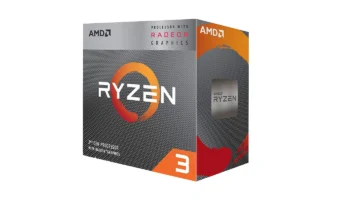
The AMD Ryzen 3 2200G is an excellent budget option for entry-level users. Released in February 2018 at just $99 (~PHP 5,500), it combines AMD’s Zen architecture with Radeon Vega 8 integrated graphics. It’s ideal for casual gamers and productivity users looking for a low-cost processor that doesn’t require a dedicated GPU. Its affordability and solid performance for its class make it a great option for budget PC builds.
Key Features and Specifications
- Processor: Ryzen 3 2200G
- Base and Boost Clock: 3.5 GHz base, up to 3.7 GHz boost
- Cores / Threads: 4 cores / 4 threads
- Integrated Graphics: Radeon Vega 8 (8 compute units, up to 1.1 GHz)
- Architecture: Zen (Raven Ridge), 14 nm process
- Cache: 128 KB L1 per core, 512 KB L2 per core, 4 MB shared L3
- TDP: 65 W
- Memory Support: Dual Channel DDR4-2933 MHz
- PCI Express Version: PCIe Gen 3
- Socket Compatibility: AM4
- Unlocked for Overclocking: Yes
- Included Cooler: Wraith Stealth
Compatibility and Performance
Motherboard Compatibility
The Ryzen 3 2200G uses AMD’s AM4 socket, which makes it compatible with a wide range of motherboards. AMD has three main chipsets for Ryzen processors: A320, B350, and X370 (plus updated versions like B450 and X470).
- A320 Chipset: This is the most basic chipset for budget builds. It does not support overclocking, but it works well if you want to use the 2200G at stock speeds. Ideal for non-gaming or office PCs.
- B350 Chipset: This chipset is more balanced and offers overclocking support for both the CPU and memory, which is useful if you want to push the Ryzen 3 2200G beyond its stock performance. This is a good middle-ground for users on a budget who want to experiment with overclocking or faster RAM.
- B450 Chipset: An upgraded version of the B350, this chipset has better overall compatibility with faster RAM and improved VRMs for more stable overclocking. It’s an ideal choice for budget gamers who want to maximize the value of the Ryzen 3 2200G.
- X370/X470 Chipsets: These high-end chipsets are designed for enthusiast builds with more advanced features like better power phases, multi-GPU support, and additional I/O connectivity. However, the 2200G is a quad-core processor with limited PCIe lanes, so using it on these boards won’t unlock its full potential. Still, they allow for more robust overclocking.
In summary, B450 motherboards are the best choice for most Ryzen 3 2200G users, offering a good balance of features, price, and overclocking potential.
Discrete Graphics Compatibility
The Ryzen 3 2200G is equipped with Radeon Vega 8 integrated graphics, but it can also work with discrete GPUs via its PCIe Gen 3 slot. However, it’s important to note that the processor only provides 8 PCIe lanes for the GPU, unlike higher-end Ryzen models that offer 16 lanes.
This limitation may not impact budget or mid-range graphics cards, but it could cause performance bottlenecks with higher-end GPUs that benefit from the full 16 lanes. For example, cards like the GTX 1650 or RX 570 are ideal matches for the Ryzen 3 2200G, as they don’t fully saturate the available PCIe bandwidth. Pairing the processor with more powerful GPUs like the RTX 3070 or RX 6800 may not deliver optimal performance due to the restricted PCIe lanes, causing a bottleneck in more demanding tasks.
Additionally, the PCIe Gen 3 interface on the Ryzen 3 2200G is still fast enough for most modern GPUs in 1080p and even 1440p gaming scenarios. The only scenario where the 8-lane limitation might be noticeable is in bandwidth-heavy tasks like video editing or 4K gaming with high-end cards.
Recommended Graphics Card: GTX 1650 – This card is perfect for pairing with the 2200G, providing good 1080p gaming performance without being held back by the processor’s PCIe limitations.
For users looking to build an affordable gaming PC, pairing the Ryzen 3 2200G with a mid-range GPU allows for balanced performance without the need for a high-end discrete graphics card. The Radeon Vega 8 integrated GPU is good enough for light gaming, but a discrete GPU will significantly boost gaming performance if you want to play more demanding titles.
Memory Compatibility
The processor officially supports DDR4-2933 MHz, but faster memory, such as DDR4-3200 MHz, can enhance both CPU and integrated graphics performance, especially in gaming.
Power Consumption and Efficiency
With a 65W TDP, the 2200G is energy-efficient, even with overclocking. The included Wraith Stealth cooler is adequate for stock speeds, but overclockers should consider an aftermarket cooler like the Cooler Master Hyper 212 to handle higher temperatures.
Overclocking Capabilities of Ryzen 3 2200G
Ease of Overclocking
The Ryzen 3 2200G is unlocked, making it simple to overclock both the CPU and its integrated Vega 8 GPU using AMD’s Ryzen Master software. With modest tweaking, you can push the CPU to 3.9 GHz and the GPU to 1.4 GHz.
However, overclocking the graphics engine can generate more heat, so investing in a better cooler is recommended.
Stability and Thermal Impact
During overclocking tests, the processor remained stable at 3.9 GHz with a 1.37V Vcore setting and the Vega 8 GPU hitting 1.4 GHz. Temperatures stayed manageable with an aftermarket cooler, peaking around 72°C under heavy load, but users should avoid pushing the voltage too high to preserve the lifespan of the chip.
Processor Performance and Benchmarks
Gaming Performance
With integrated Vega 8 graphics, the 2200G handles light gaming at 1080p on low to medium settings. Popular games like Valorant and Fortnite run at 40-60 FPS, while heavier titles like GTA V might need lower settings or resolutions for smoother performance.
Productivity Performance
For everyday tasks such as web browsing, office applications, and light photo editing, the Ryzen 3 2200G performs well. However, for more demanding work like video editing or 3D rendering, the processor may struggle due to its limited core count.
Video: Ryzen 2200G Processor Games Benchmark
Ryzen 3 2200G Desktop Computer Specifications in Benchmarking
- CPU: Ryzen 3 2200G 3.50 GHz (Boost 3.70 GHz)
- CPU Cooler: AMD Ryzen Stock Cooler
- APU: Radeon Vega 8 Graphics (2GB VRAM)
- SSD: 240GB SATA Kingston A400
- HDD 1: WD Blue 500GB 7200RPM
- HDD 2: 1TB Seagate Barracuda 7200RPM
- OS: Windows 10 Pro 64-bit
- Motherboard: ASRock A320M-DVS
- PSU: 550W BeQuiet! SYSTEM POWER B8
- RAM: 32GB DDR4 3200MHz (2x16GB Dual Channel – Kingston FURY Beast)
In benchmark tests, the AMD Ryzen 3 2200G delivers solid performance in less demanding games like Apex Legends and Counter Strike 2, where it achieves smooth gameplay at low to medium settings. However, in graphically intensive titles such as Alan Wake 2, Assassin’s Creed Mirage, and Battlefield 2042, the processor struggles, requiring lower settings to maintain playable frame rates. While it handles lighter games like Dota 2 and Valorant reasonably well, more demanding games like Baldur’s Gate 3 and Cyberpunk 2077 may experience frame drops, especially in heavy scenes. Overall, the 2200G is suitable for casual gamers at modest settings.
Price and Availability
The Ryzen 3 2200G is available for around $40 (~PHP 2,400) in the Philippines used market, making it an excellent choice for budget builds. While newer options exist, this processor still holds up well for light gaming and productivity.
Pros and Cons
Pros:
- Affordable, excellent for budget builds
- Decent integrated graphics for casual gaming
- Overclocking support for both CPU and GPU
- Energy-efficient at 65W TDP
Cons:
- Limited to 4 cores and 4 threads
- Struggles with heavy multitasking or demanding AAA games
- Integrated graphics not suitable for high-end gaming
Who Should Use the Ryzen 3 2200G?
The Ryzen 3 2200G is best suited for entry-level gamers, home office setups, and casual users who don’t want to invest in a discrete graphics card. It’s a great processor for those building a budget PC that can handle light gaming and everyday tasks without breaking the bank.
Verdict
The AMD Ryzen 3 2200G remains a solid choice for budget-conscious users in 2024. If you can find it around PHP 2,400 ($40), it’s an excellent value, especially for light gaming and general use. While not the most powerful option today, it’s still a highly recommended processor for budget builds and casual users.
How to Download Graphics Driver for Ryzen 3 2200G
To get the best performance from your Ryzen 3 2200G with its Vega 8 integrated graphics, you’ll need to download the latest drivers for Windows 10 or Windows 11. Proper drivers ensure smooth gaming and optimized graphics performance.
Download the latest AMD graphics driver for Ryzen 3 2200G to unlock the full potential of your system and enjoy a better gaming experience.
Download Now from AMD’s Official Website for the most up-to-date drivers