The number of programs that launch at start up is the most common problem. The methods listed here will work from Windows xp to Windows 7.
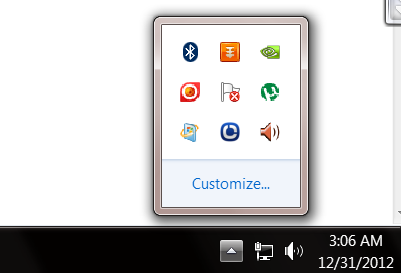 |
The thing you do is to start the computer and then look in the system tray. If you see a lot of icon things in there, then it may be the time to change what launches at startup.Typically you will be able to find a way to disable the program from automatically starting with Windows.
The next option is :
- Click the Start Button for windows xp or windows logo button for windows 7 and vista
- Select ‘Run’ for windows xp or search for windows 7 and vista
- In the box type ‘msconfig’ without the quotes
- Click OK or hit the enter key in your keyboard
 |
The system configuration panel – click on “startup” tab. There is a list of programs that run at start up. Un-check the ones that you don’t want to have run at start up. In my experienced it’s okay to unchecked all the selections except the anti-virus. After selecting the list of program, click okay and restart the computer.