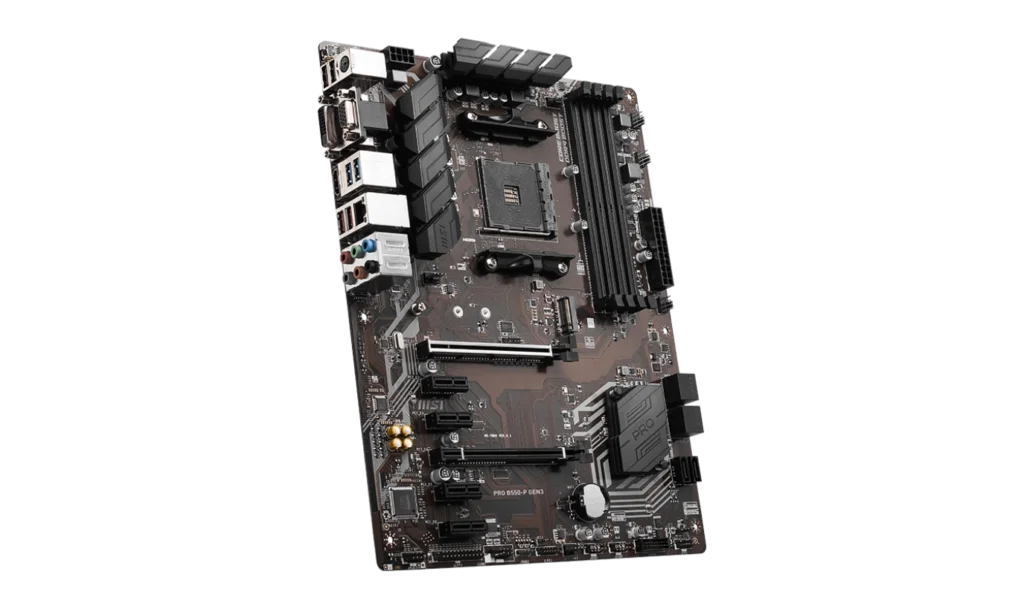
The MSI PRO B550-P GEN3 is an affordable ATX motherboard targeted at users who want reliable performance with essential features. Equipped with the AMD B550 chipset, it supports Ryzen 5000, 3000, and 4000 G-Series processors, making it a great option for both gamers and productivity users.
Priced at around PHP 6,900 (~$122 USD) for a brand-new unit, it offers a solid feature set at an entry-level price, perfect for budget-conscious builders looking for performance and expandability.
Key Features and Specifications
- Motherboard Model: MSI PRO B550-P GEN3
- Socket: AMD AM4
- Chipset: AMD B550
- Memory Channels: Dual
- DIMM Slots: 4, supporting up to 128GB of DDR4 memory
- PCI-E Slots: 2x PCIe x16 slots, PCI_E1 supports PCIe 3.0 x16 (from the CPU), PCI_E4 supports PCIe 3.0 x4 (from the chipset), 4x PCIe x1 slots (for additional peripherals)
- Storage: 6x SATA III ports (6Gbps), 1x M.2 slot (PCIe 3.0 x4 and SATA, supporting 2260/2280/22110 storage devices)
- USB Ports: Front panel: 2 USB 3.2 Gen 1, 4 USB 2.0
- Rear panel: 2 USB 3.2 Gen 2 Type-A, 2 USB 3.2 Gen 1 Type-A, 4 USB 2.0
- Networking: Realtek® 8111H Gigabit LAN
- Audio: Realtek® ALC897 Codec, 7.1-Channel HD Audio
- Display Outputs: HDMI 2.0b (supports 4K @ 30Hz), VGA and DVI-D (legacy display outputs)
- Form Factor: ATX (30.5 cm x 24.4 cm)
Performance and Compatibility
CPU Compatibility
The MSI PRO B550-P GEN3 supports a wide range of AMD Ryzen processors, including Ryzen 5000, 3000, and 4000 G-Series. This gives users access to the latest and most powerful desktop CPUs, making it a versatile option for both gaming and multitasking.
However, note that it is not compatible with Ryzen 5 3400G and Ryzen 3 3200G, which may be a consideration for some builders using older APUs.
Memory Compatibility
With 4 DIMM slots supporting up to 128GB of DDR4 RAM, this motherboard can handle a variety of workloads, from gaming to video editing and streaming. It supports memory speeds up to 4400 MHz with A-XMP OC Mode, providing plenty of headroom for memory overclocking and improved performance.
Graphics Compatibility
The MSI PRO B550-P GEN3 supports integrated graphics from AMD Ryzen 4000 G-Series processors, making it a good option for budget builds without a dedicated GPU. It features:
HDMI 2.0b port that supports up to 4K @ 30Hz.
DVI-D and VGA ports, which cater to older displays, making it a suitable board for those who still use legacy monitors.
Storage Options
The MSI PRO B550-P GEN3 provides a balanced storage setup:
- 6 SATA III ports offer ample space for traditional HDDs and SSDs.
- 1 M.2 slot (PCIe 3.0 x4) allows for fast NVMe SSDs, providing faster boot times and improved data transfer speeds compared to SATA-based storage.
While only having a single M.2 slot might seem limiting for those building more storage-intensive setups, it should suffice for most general use cases and gaming builds.
Expansion and Connectivity
Expansion Slots
The 2 PCIe x16 slots provide the ability to add a discrete graphics card and an additional expansion card, such as a secondary GPU or NVMe adapter. However, the PCI_E4 slot runs at x4 speed, which is ideal for secondary expansion cards but not suited for high-performance GPUs.
The 4 PCIe x1 slots are handy for adding peripherals like sound cards, network cards, or other PCIe devices, offering flexibility to expand as needed.
USB Connectivity
With 2 USB 3.2 Gen 2 ports on the rear panel, 2 USB 3.2 Gen 1 on both front and rear, and multiple USB 2.0 options, the board offers comprehensive USB connectivity, making it suitable for users who need multiple peripherals, storage devices, or external drives.
Audio and Networking
Audio
The Realtek ALC897 Codec offers 7.1-channel HD audio, delivering decent sound quality for gamers and general users. While it is adequate for most everyday needs, audiophiles or users who require high-fidelity audio might prefer an external sound card or DAC for better sound quality.
Networking
The motherboard is equipped with a Realtek® 8111H Gigabit LAN controller, which ensures stable and fast wired internet connectivity. It lacks built-in Wi-Fi, so users requiring wireless connectivity will need to purchase a separate Wi-Fi card or adapter.
Power, Cooling, and Overclocking
Power Connectors
The 24-pin ATX and 8-pin ATX 12V connectors ensure that the board receives sufficient power for demanding tasks. While not designed for heavy overclocking, it can handle moderate CPU and memory overclocking with ease.
Cooling
The board features:
- 1 CPU fan connector
- 1 water pump fan connector
- 4 system fan connectors
- This setup provides enough cooling options for most mid-range builds, ensuring that the system remains stable during gaming or intensive workloads.
Pricing and Availability
The MSI PRO B550-P GEN3 is available in the Philippines for around ₱6,900 PHP, making it an affordable choice for users looking to build a system with PCIe 3.0 support and modern features. It’s an attractive option for budget-conscious builders who still want decent performance and expandability.
Pros and Cons
Pros:
- Affordable: Great value for its price with PCIe 3.0 x16 slots and robust connectivity options.
- Dual M.2 support: Provides fast storage options for NVMe SSDs.
- Multi-GPU support: Compatible with AMD CrossFire for dual-GPU setups.
- Legacy display support: Includes VGA and DVI-D ports for older displays.
Cons:
- Only 1 M.2 slot: Limited NVMe storage expandability compared to higher-end boards.
- No PCIe 4.0: Unlike higher-end B550 boards, this board only supports PCIe 3.0, which may limit future upgrade options.
- No built-in Wi-Fi: Users who need wireless connectivity will need to buy an external adapter.
Who Should Buy the MSI PRO B550-P GEN3?
This motherboard is a great fit for:
- Budget-conscious gamers: Looking for an affordable entry-level gaming build with support for the latest Ryzen processors.
- Office users or home creators: Who need a stable system for productivity, with plenty of expandability for additional peripherals.
- Legacy system upgraders: Users who need a mix of modern features with support for older monitors and peripherals like VGA and DVI-D.
Final Verdict
The MSI PRO B550-P GEN3 offers great value at a budget-friendly price, delivering solid performance for gamers, creators, and office users. While it lacks PCIe 4.0 and built-in Wi-Fi, it compensates with essential features like dual M.2 slots, robust USB connectivity, and 7.1-channel audio.
It’s an excellent choice for users who want to build a reliable system on a budget, making it a highly recommended option for entry-level to mid-range builds.
To download the latest drivers and BIOS for the MSI PRO B550-P GEN3 Motherboard, visit the official MSI Support page. Search for your motherboard model, then select your operating system (e.g., Windows 10 or Windows 11 64-bit) under the Drivers & Downloads section. Download essential drivers such as chipset, LAN, and audio to ensure your system operates seamlessly.
For a BIOS update, download the latest version and save it to a FAT32-formatted USB drive. Restart your PC and press the Delete key during startup to enter the BIOS menu. Navigate to the M-Flash section, select the BIOS file from the USB drive, and follow the on-screen instructions to complete the update. Ensure the PC remains powered on throughout the process, as it will reboot automatically after the update.
Visit the MSI Support page to download all necessary drivers and BIOS updates for your MSI PRO B550-P GEN3 Motherboard.