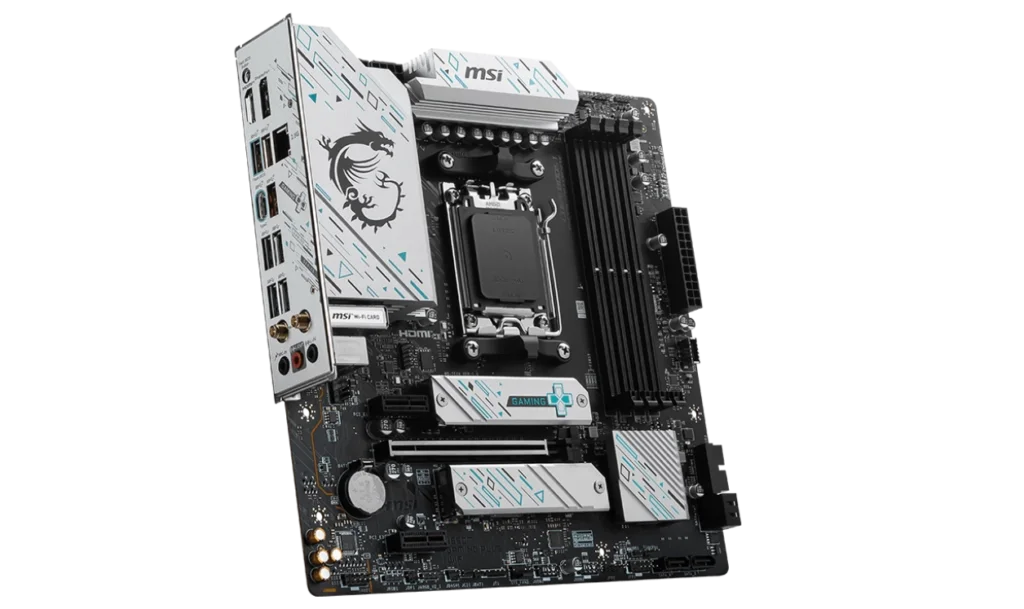
The MSI B650M GAMING PLUS WIFI is a micro-ATX motherboard designed for gamers and general PC users who need reliable performance without overspending. With AMD’s B650 chipset and AM5 socket, it supports Ryzen 7000 series processors, making it ideal for budget-friendly gaming and productivity builds.
The addition of Wi-Fi 6E, DDR5 support, and robust PCIe 4.0 connectivity ensures this motherboard delivers a modern feature set at a competitive price point.
Key Features
- Motherboard Model: MSI B650M GAMING PLUS WIFI
- Socket: AM5
- Chipset: AMD B650
- Memory Support: 4x DDR5 DIMM slots, up to 256GB, with overclocking speeds up to 7200MHz
- PCI-E Slots: 1x PCIe 4.0 x16 slot for GPUs, 2x PCIe 3.0 x1 slots for peripherals
- Storage Options: 2x M.2 PCIe 4.0 x4 slots for NVMe SSDs, 4x SATA 6G ports for SSDs and HDDs
- Networking: Realtek 2.5G LAN for fast wired connections, Wi-Fi 6E for high-speed wireless networking
- Audio: Realtek ALC897 Codec with 7.1-Channel High-Definition Audio
- Video Output: HDMI 2.1 and DisplayPort 1.4 for integrated graphics
- Form Factor: Micro-ATX (243.84mm x 243.84mm)
Compatibility and Performance
CPU Compatibility
The MSI B650M GAMING PLUS WIFI supports AMD Ryzen 7000 series processors via the AM5 socket, enabling it to harness the power of AMD’s latest multi-core CPUs. This makes the motherboard suitable for gaming, multitasking, and light content creation.
Whether you’re running a budget-friendly Ryzen 5 7600 or a high-performance Ryzen 7 7700, this board provides the platform you need for stable and efficient performance.
Memory Compatibility
With 4 DDR5 DIMM slots, this motherboard supports up to 256GB of DDR5 RAM at overclocking speeds of 7200MHz, offering blazing-fast performance for gaming, streaming, and productivity tasks.
DDR5 memory improves bandwidth and latency, ensuring smoother gameplay and quicker application response times.
The inclusion of AMD EXPO (Extended Profiles for Overclocking) simplifies memory overclocking, letting users extract maximum performance from their RAM without extensive tweaking. This feature makes it easy for both beginners and enthusiasts to boost system performance with minimal effort.
Graphics Compatibility
The motherboard’s PCIe 4.0 x16 slot is designed to accommodate modern GPUs, such as the NVIDIA GeForce RTX 3060 Ti/4060 or AMD RX 6700 XT, ensuring excellent gaming performance at 1440p or even 4K resolutions.
The PCIe 4.0 interface provides ample bandwidth for demanding graphics cards, ensuring smooth rendering and high frame rates.
For users without a discrete GPU, the HDMI 2.1 and DisplayPort 1.4 outputs support resolutions up to 4K at 60Hz, making this motherboard suitable for casual gaming, media streaming, and general productivity with integrated graphics.
Power and Cooling
The MSI B650M GAMING PLUS WIFI includes 1x CPU fan header, 1x pump fan header, and 3x system fan headers, allowing users to set up efficient cooling solutions for their builds. These headers ensure adequate airflow for maintaining system stability during gaming or multitasking. T
he dedicated pump header also supports liquid cooling solutions for those looking to overclock or run quieter builds.
Power Supply Recommendations
- Integrated Graphics Builds: A 450W PSU (e.g., EVGA 450 BR) is sufficient for basic setups with no discrete GPU.
- Discrete Graphics Builds:
- For GPUs like the RTX 3060 Ti, a 650W PSU (e.g., Cooler Master MWE Gold 650) is recommended.
- For high-end GPUs like the RTX 4070, an 850W PSU (e.g., Corsair RM850x) is ideal for ensuring stability during peak loads.
Storage and Expansion
The MSI B650M GAMING PLUS WIFI offers 2x M.2 PCIe 4.0 x4 slots, allowing users to install ultra-fast NVMe SSDs for improved boot times and data transfer speeds. Additionally, the 4x SATA 6G ports support traditional HDDs or SSDs, making it easy to expand storage for media libraries or backups.
Connectivity and Networking
This motherboard comes equipped with multiple USB ports for versatile connectivity, including USB 20Gbps Type-C, ensuring fast data transfers for external storage and peripherals. With Wi-Fi 6E, users benefit from high-speed wireless networking, reduced latency, and improved signal stability, making it perfect for online gaming and streaming.
The Realtek 2.5G LAN ensures a stable wired connection for those who prefer a lag-free gaming experience.
Pricing and Availability
- Price in the Philippines: PHP 9,500 (~USD 170)
The MSI B650M GAMING PLUS WIFI is widely available through online retailers like Lazada and Shopee, as well as local PC stores. At this price point, it provides great value for budget-conscious gamers looking for solid performance and modern features.
Pros and Cons
Pros
- DDR5 Support: High-speed RAM support up to 7200MHz for excellent performance.
- Wi-Fi 6E and Bluetooth 5.3: Future-proof wireless connectivity.
- Robust PCIe 4.0 Slot: Excellent compatibility with modern GPUs.
- Affordable Price: Competitive pricing for a feature-packed motherboard.
Cons
- No PCIe 5.0 Support: Limited to PCIe 4.0 for storage and GPUs.
- Basic Audio Codec: The Realtek ALC897 is adequate but may not satisfy audiophiles.
Who Should Use the MSI B650M GAMING PLUS WIFI?
This motherboard is perfect for budget gamers, content creators, and productivity users seeking reliable performance without overspending. It’s a great choice for those building a compact yet powerful gaming PC or a work-from-home productivity setup, offering a mix of modern features and affordability.
Final Verdict
The MSI B650M GAMING PLUS WIFI offers exceptional value, delivering DDR5 memory, PCIe 4.0, and Wi-Fi 6E at a reasonable price. It’s an excellent choice for budget-conscious gamers and professionals looking to build a reliable and future-proof system on AMD’s AM5 platform. Priced at PHP 9,500, this motherboard provides everything you need for a capable gaming or productivity PC without compromising on essential features.
Download MSI B650M GAMING PLUS WIFI Drivers and BIOS Update
To download the latest drivers and BIOS for the MSI B650M GAMING PLUS WIFI, visit the official MSI Support page. Search for your motherboard model and select your operating system (e.g., Windows 10 or Windows 11 64-bit) under the Drivers & Downloads section. Download essential drivers such as chipset, LAN, Wi-Fi, and audio to ensure proper system functionality.
Steps for a BIOS Update
- Visit the MSI Support page and download the latest BIOS version for the MSI B650M GAMING PLUS WIFI.
- Save the BIOS file to a FAT32-formatted USB drive.
- Restart your PC and press the Delete key during startup to enter the BIOS menu.
- Navigate to the M-Flash utility in the BIOS menu.
- Select the BIOS file from the USB drive and follow the on-screen instructions to complete the update.
⚠️ Important: Ensure that your PC remains powered on during the update process to prevent any interruptions. The system will automatically reboot once the update is successfully completed.
Visit the official MSI Support page regularly to keep your MSI B650M GAMING PLUS WIFI drivers and BIOS updated, ensuring peak performance and stability for your gaming and multitasking needs.