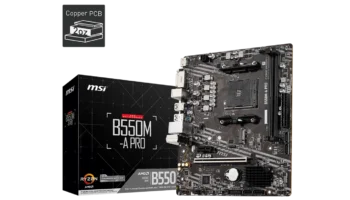
The MSI B550M PRO is a budget-friendly micro-ATX motherboard that provides a balanced mix of essential features for general computing and light gaming. Designed for entry-level builds and home office setups, this motherboard is an ideal option for users who want reliable performance without overspending.
In this review, we’ll break down the key features, compatibility, and performance to help you decide if the MSI B550M PRO is the right choice for your next PC build.
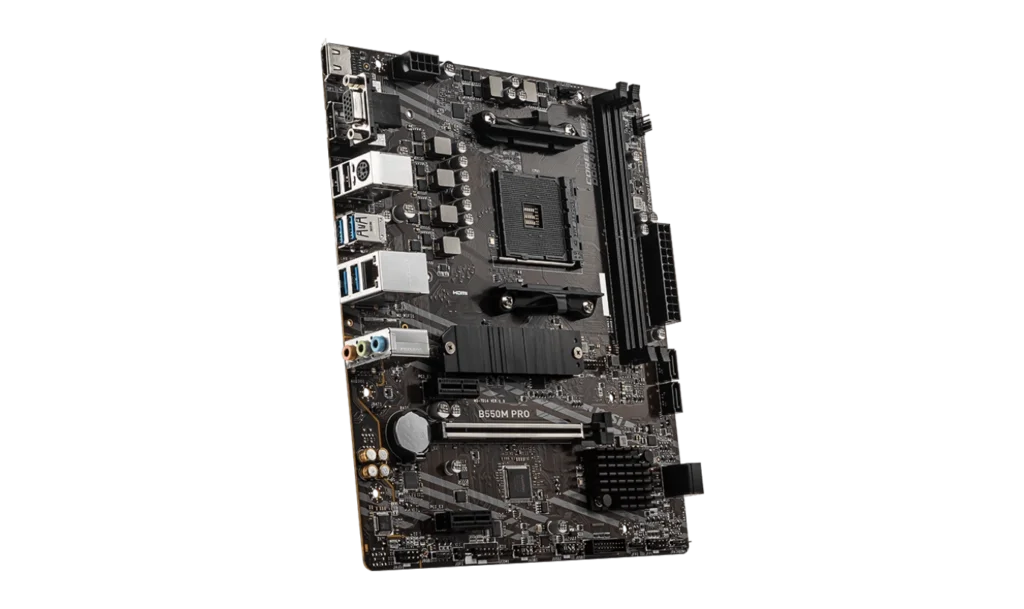
Key Features and Specifications
- Motherboard Model: MSI B550M PRO
- Socket: AMD AM4
- Chipset: AMD B550
- Memory Support: 2 DIMM slots, up to 64GB DDR4 RAM
- PCI-E Slots: 1 PCIe x16 Gen4 slot, 2 PCIe Gen3 x1 slots
- Storage Options: 4 SATA III ports, 1 M.2 slot supporting PCIe Gen4 and NVMe SSDs
- USB Ports: Front: 2 USB 3.2 Gen1 Type-A, 4 USB 2.0 ports
- Rear: 4 USB 3.2 Gen1 Type-A, 4 USB 2.0 ports
- Expansion: TPM header, 4-pin RGB header, 3-pin RAINBOW LED connector
- Audio: Realtek ALC892/ALC897 codec with 7.1-channel surround sound
- Video Output: 1 HDMI, 1 VGA, 1 DisplayPort
- RAID: RAID 0, 1, and 10 for SATA devices
- Form Factor: Micro-ATX
Compatibility and Performance
CPU Compatibility
The MSI B550M PRO supports AMD Ryzen 5000, 4000 G-Series, and 3000 Series desktop processors using the AM4 socket. This makes it a versatile option for budget and entry-level builds, allowing users to scale their performance depending on the CPU chosen.
Recommended Processors:
- With Integrated Graphics: AMD Ryzen 5 4600G, Ryzen 7 5700G
- Without Integrated Graphics: AMD Ryzen 5 5600X, Ryzen 7 5800X
These processors offer solid performance for tasks like browsing, office work, light gaming, and content consumption.
Memory Compatibility
The motherboard comes with 2 DDR4 DIMM slots, supporting up to 64GB of RAM. It supports RAM speeds up to 4600 MHz with overclocking (A-XMP), which is sufficient for most general computing tasks and light gaming. However, if you need to run memory-heavy applications like video editing software, the limited number of DIMM slots might be a drawback.
Graphics Compatibility
The MSI B550M PRO includes 1 PCIe 4.0 x16 slot, which can handle entry-level to mid-range graphics cards for light to moderate gaming and multimedia tasks. For those relying on integrated graphics, the board features VGA, HDMI, and DisplayPort outputs, allowing for flexible monitor configurations.
Recommended GPUs:
- NVIDIA: GTX 1650, GTX 1660 Super
- AMD: Radeon RX 550, RX 560
This setup is ideal for users who need integrated graphics support but want the option to upgrade to a discrete GPU for gaming or more demanding applications.
Storage and Expansion
The MSI B550M PRO offers 4 SATA III ports for traditional hard drives and SSDs, as well as 1 M.2 slot supporting PCIe Gen4 and NVMe SSDs. This allows users to configure a fast storage setup, combining high-speed NVMe SSDs with larger SATA-based storage for files and media.
While the single M.2 slot may limit future expansions, it still provides sufficient flexibility for most basic builds.
Power and Cooling
The motherboard features a basic VRM design, which is well-suited for entry-level systems that don’t require heavy overclocking. It has 1 CPU fan header and 1 system fan header, providing enough cooling for basic setups. However, users planning to build high-performance systems with overclocked components may need to add extra cooling solutions.
Recommended Power Supply: A 400W to 500W power supply should be sufficient for most basic office or light gaming builds.
Pricing and Where to Buy MSI B550M PRO
- Price in the Philippines: PHP 5,600 (~USD 100)
At PHP 5,600, the MSI B550M PRO is a great choice for budget-conscious users looking to build a reliable system for everyday tasks, such as office work, browsing, and media playback. It includes key features at a competitive price, making it an attractive option for entry-level and budget builders.
Pros and Cons
Pros:
- Affordable: Great value at PHP 5,600 (~USD 100).
- Compact: Micro-ATX form factor fits well in small and mid-sized cases.
- Decent connectivity: Multiple display outputs (HDMI, VGA, DisplayPort) offer flexible monitor setups.
- PCIe Gen4: Future-proofed with PCIe Gen4 support for faster GPUs and NVMe SSDs.
Cons:
- Limited Memory Slots: Only 2 DIMM slots may limit future memory upgrades.
- Basic VRM: Not designed for heavy overclocking or high-performance builds.
- No built-in Wi-Fi: Lacks wireless networking support, requiring a separate Wi-Fi card or adapter.
Who Should Use the MSI B550M PRO?
The MSI B550M PRO is perfect for budget-conscious users, casual gamers, and home office setups. It’s ideal for building a family PC, a media center, or an entry-level gaming rig. The motherboard offers reliable performance for users who don’t require advanced features like Wi-Fi or extensive overclocking capabilities.
Final Verdict
The MSI B550M PRO excels in delivering essential features at an affordable price, making it an excellent choice for budget builders and general users. While it lacks high-end features like built-in Wi-Fi and extensive overclocking support, it’s a solid option for basic computing tasks and light gaming.
For PHP 5,600 (~USD 100), the MSI B550M PRO offers excellent value for users who need a reliable motherboard with enough features to handle everyday computing without breaking the bank.
How to Download MSI B550M PRO Driver and BIOS Update
To download the latest drivers and BIOS for the MSI B550M PRO, visit the official MSI Support page. Search for your motherboard model, then select your operating system (e.g., Windows 10 or Windows 11 64-bit) under the Drivers & Downloads section. Download essential drivers such as the chipset, LAN, and audio to ensure proper functionality of your system.
For a BIOS update, download the latest version, save it to a FAT32-formatted USB drive, and restart your PC. During startup, press the Delete key to enter the BIOS menu and navigate to M-Flash. Select the BIOS file from the USB drive and follow the on-screen instructions to complete the update. Ensure that the PC remains powered on throughout the process, as it will reboot automatically after the update.
Visit the MSI Support page to download all necessary drivers and BIOS updates for your motherboard.