This problem is applicable to all computer, it doesn’t matter if it is Windows XP, Windows 7 or Windows 8 Computer. The error appears when Computer can’t detect hard disk drive. With this error you have to check the following:
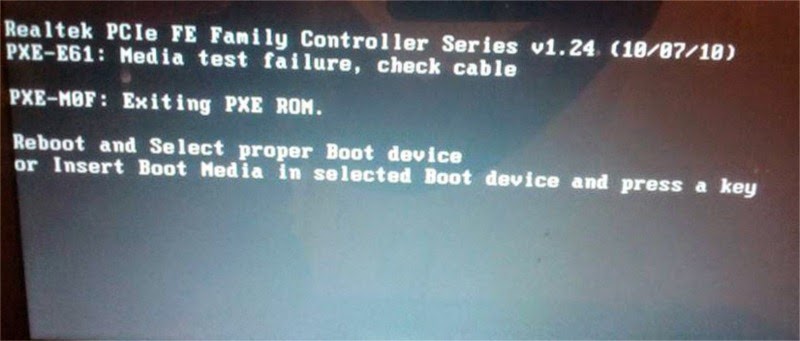
Possible Problem:
- SATA Cable is not connected from disk drive to motherboard
- Power Supply Cable properly connected to hard disk drive
- Loose Connection Either Power or SATA Cable
- Defective SATA Slot (Rare) or SATA Cable (Sometimes
- Defective hard disk drive

Possible Solution:
For Sata Cable connector all you have to do is reinsert the cables from motherboard to hard disk drive. If it still doesn’t work just try to replace the cable with a new one .
Another Possible culprit is the power supply can’t provide enough power to the device, you may also try to check the disk drive to another computer and see if it can be detected. The last one, the disk drive is defective. Just replace with a new one.