Connect the Ethernet cable from computer to the router LAN port. To access the router type 192.168.0.50 or type http://dlinkap to any web browser (Chrome, firefox or safari).
The dlink browser interface login page will appear.
The default username is “admin” password: “none”
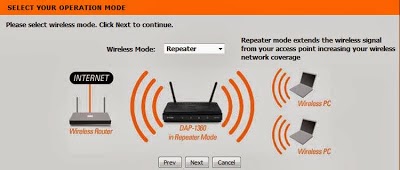
After entering the username, click launch the wireless setup wizard. Click next Select repeater from the drop-down menu. Select the preferred connection. Watch the video below
In this video I configure my Dlink router as repeater. I have a modem which is capable of providing I.P address to Local Area Network (LAN) and Wifi client computer.
Watch The Video Tutorial of Installation of Repeater
If the device D-link DAP 1360 Access Point is already configured and you want to reset the settings.
You can reset the factory defaults by pressing the hard reset button. See the video


