close
Software Fixes

Windows Cannot Access the Installation Sources – Install Windows Error

This error appears when installing Windows Operating System. The causes of this failure are;

  • Probably damaged DVD or CD Disc installer
  • If optical disc is okay,  the CD/ DVD ROM or Writer have a problem reading the disc
  • Damage usb flash drive files or the data copied to USB is incomplete
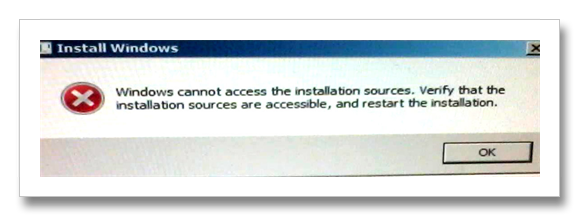
Install Windows Error
To fix the error:

  • Try to change another optical disc installer
  • Change optical media device
  • Re-create usb bootable installer
Tags : InstallationWindows 7
Joemar Bagalanon

The author Joemar Bagalanon

I’m a tech specialist with a background in Computer Repair, Multimedia Arts, and Computer Science. With experience owning an Internet café and working as an IT Technician for small and medium-sized businesses, I specialize in troubleshooting software and hardware issues. I’m here to share knowledge and keeping up with the latest technology trends to inspire others through my writing and advises.