The MSI MAG B650M MORTAR WIFI is a micro-ATX motherboard packed with essential features for gamers and content creators alike. Supporting the latest AMD Ryzen 7000, 8000, and 9000 series processors on the AM5 socket, this board combines robust performance, DDR5 support, and Wi-Fi 6E.
It’s tailored for mid- to high-range builds focused on gaming and productivity, offering a powerful foundation for users looking for efficiency in a compact form factor.
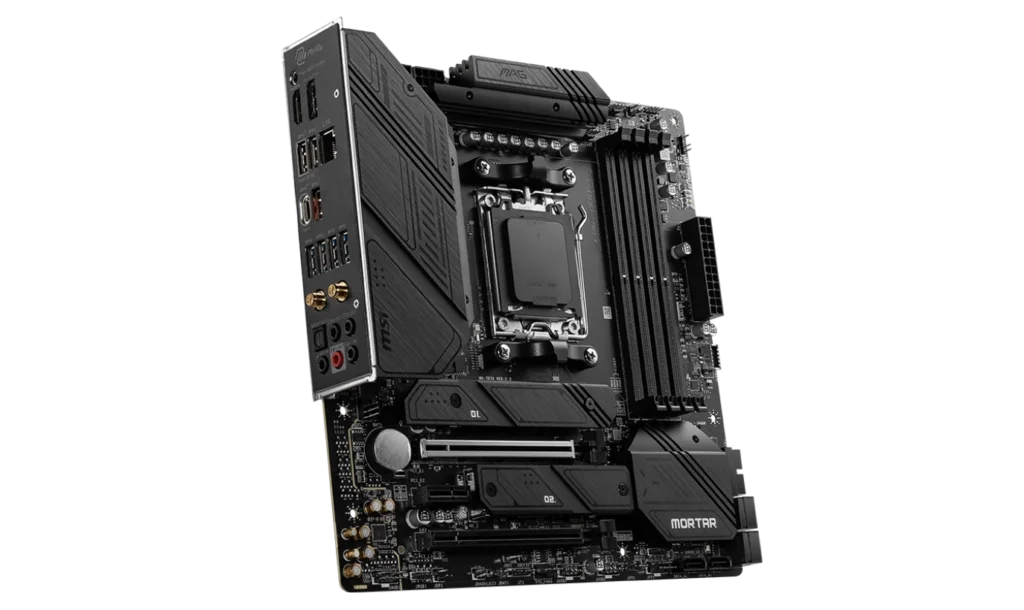
Key Features and Specifications of MSI MAG B650M MORTAR WIFI
- Motherboard Model: MSI MAG B650M MORTAR WIFI
- Socket: AM5
- Chipset: AMD B650
- Memory Support: 4x DDR5 DIMM slots, up to 256GB, with overclocking up to 7600MHz+
- PCI-E Slots: 2x PCIe x16 (PCIe 4.0 x16 from CPU, PCIe 4.0 x4 from chipset) for discrete GPUs
- 1x PCIe x1 slot for additional expansions
- Storage Options: 2x M.2 slots (PCIe 4.0 x4) for fast NVMe SSDs
- 6x SATA 6G ports for additional storage
- USB Ports: Rear: 4x USB 5Gbps Type-A, 3x USB 10Gbps Type-A, 1x USB 20Gbps Type-C
- Front: 4x USB 2.0, 2x USB 5Gbps Type-A, 1x USB 10Gbps Type-C
- Networking: Realtek 2.5G LAN for stable wired connections
- Wi-Fi 6E and Bluetooth 5.3 for high-speed wireless connectivity
- Audio: Realtek ALC4080 Codec, 7.1-Channel High-Definition Audio
- Video Output: HDMI 2.1 and DisplayPort 1.4 for integrated graphics support
- Form Factor: Micro-ATX (243.84mm x 243.84mm)
Compatibility and Performance
CPU Compatibility
The MSI MAG B650M MORTAR WIFI is built to support AMD Ryzen 7000, 8000, and 9000 series processors using the AM5 socket, ensuring compatibility with AMD’s latest multi-core CPUs. This board provides a future-proof platform for those seeking high performance across a range of applications.
The AM5 socket and B650 chipset together make this motherboard an excellent choice for demanding tasks such as high-resolution gaming, video editing, and intensive multitasking. By supporting these advanced Ryzen processors, users can rely on efficient, fast performance even with complex workflows, extending the motherboard’s relevance well into the future as newer, more powerful CPUs are released.
CPU Recommendations
The MSI MAG B650M MORTAR WIFI is compatible with a range of AMD Ryzen CPUs, allowing users to choose based on their specific performance needs:
- For General Productivity and Light Gaming: The Ryzen 5 7600 provides excellent multi-core performance at a budget-friendly price. It’s ideal for daily tasks, productivity applications, and moderate gaming.
- For High-Performance Gaming: The Ryzen 7 7700X delivers a strong balance of high clock speeds and core count, making it a perfect choice for gamers seeking smooth performance in high-resolution gaming and multitasking.
- For Professional Workloads: The Ryzen 9 7900X or 7950X offers unmatched multi-threaded performance, making it ideal for content creators, video editors, and professionals using software that demands high processing power.
Each of these Ryzen options is compatible with the AM5 socket, providing room for future upgrades as newer Ryzen processors are released.
Memory Compatibility
With 4 DDR5 DIMM slots, the B650M MORTAR WIFI supports up to 256GB of DDR5 memory at speeds reaching 7600MHz with overclocking. This high memory bandwidth is perfect for multitasking, gaming, and demanding productivity applications.
AMD EXPO support makes memory overclocking straightforward, letting users achieve boosted performance without complex configurations. The DDR5 platform enhances the board’s responsiveness, delivering smooth load times and lag-free performance.
Graphics Compatibility
This motherboard features 2 PCIe 4.0 x16 slots, making it a reliable choice for pairing with a dedicated graphics card. This capability allows gamers to install high-end GPUs, like the NVIDIA RTX 3000/4000 series or AMD RX 6000/7000 series, to handle intense gaming and 3D rendering tasks seamlessly.
For users using integrated graphics, the HDMI 2.1 and DisplayPort 1.4 outputs support up to 4K at 60Hz. This makes it convenient for those who need high-definition display support without a dedicated GPU, catering to casual gamers, media enthusiasts, or productivity users.
Graphics Card Recommendations
This motherboard’s PCIe 4.0 x16 slots support powerful discrete GPUs, allowing users to select a graphics card suited to their performance needs:
- For Casual and Light Gaming: The AMD Radeon RX 6600 or NVIDIA GeForce GTX 1660 Super offers solid 1080p performance at a reasonable price, ideal for users playing lighter or less demanding games.
- For High-Performance Gaming: The NVIDIA GeForce RTX 3060 Ti or AMD Radeon RX 6700 XT provides excellent 1440p gaming performance, enabling smooth gameplay in popular AAA titles at high settings.
- For 4K Gaming and Professional Use: The NVIDIA RTX 4070 or AMD Radeon RX 7900 XT offers powerful 4K gaming capabilities and is ideal for users who need professional-level performance for 3D rendering, video editing, and graphic-intensive applications.
By pairing the MSI MAG B650M MORTAR WIFI with the right CPU and GPU, users can create a high-performing system tailored to their gaming, productivity, or creative needs, all while ensuring compatibility and upgradability for the future.
Storage and Expansion
The MSI MAG B650M MORTAR WIFI includes 2x M.2 slots (PCIe 4.0 x4) and 6x SATA 6G ports. The M.2 slots offer rapid read and write speeds, ideal for NVMe SSDs, and boost performance for fast boot times and reduced load times in applications.
Additionally, the board supports RAID 0, 1, and 10 configurations on both M.2 and SATA drives, giving users flexible options for balancing speed and data redundancy.
Power and Cooling
The MAG B650M MORTAR WIFI provides comprehensive cooling support with 1x CPU fan header, 1x pump fan header, and 3x system fan headers. This setup is great for efficient cooling in compact builds. The pump fan header is a bonus for users considering liquid cooling solutions, helping maintain optimal temperatures during extended gaming or CPU-intensive work.
Power Supply Recommendations
Integrated Graphics Builds: A 450W–550W PSU will work well, with options like the Corsair CV450 offering reliability at an affordable price.
Discrete Graphics Builds
- For mid-range GPUs (e.g., RTX 3060/4060), a 650W PSU such as the Corsair RM650 is recommended.
- For high-end GPUs (e.g., RTX 4070/4080), an 850W PSU like the EVGA SuperNOVA 850 G5 ensures stability for advanced configurations.
Connectivity and Networking
The MSI MAG B650M MORTAR WIFI offers extensive connectivity options, with USB 20Gbps Type-C for fast data transfers and multiple USB 10Gbps and 5Gbps Type-A ports for peripherals.
It also has Realtek 2.5G LAN for high-speed wired connections and Wi-Fi 6E with Bluetooth 5.3, making it perfect for seamless gaming, streaming, and remote work.
Pricing and Availability
Price in the Philippines: PHP 14,800 (~USD 260)
At a price of PHP 14,800, the MSI MAG B650M MORTAR WIFI offers a powerful blend of performance, connectivity, and future-proofing that’s suitable for gaming and productivity enthusiasts alike.
Pros and Cons
Pros
- Future-Proof with AM5 Socket: Compatible with AMD Ryzen 7000, 8000, and 9000 series CPUs.
- High-Speed DDR5 Support: Supports up to 256GB with speeds up to 7600MHz.
- Versatile Connectivity: Wi-Fi 6E, Bluetooth 5.3, and USB 20Gbps Type-C.
- Extensive Cooling Options: Multiple fan headers, including a pump fan header.
Cons
- No PCIe 5.0: Limited to PCIe 4.0, which is adequate for current GPUs but not the latest tech.
- Basic Audio Codec: The Realtek ALC4080 may not meet the needs of high-fidelity audio users.
Who Should Use the MSI MAG B650M MORTAR WIFI?
The MSI MAG B650M MORTAR WIFI is perfect for gamers, content creators, and multitaskers seeking a robust, compact motherboard that’s ready for demanding tasks. It’s ideal for users looking for a future-proof board with strong connectivity and expansion options at an affordable price.
Final Verdict
The MSI MAG B650M MORTAR WIFI provides an excellent mix of features, future-proofing, and performance, making it a solid choice for mid-range to high-end builds. With DDR5 support, Wi-Fi 6E, and versatile storage options, this motherboard offers top-tier performance.
At PHP 14,800 (~USD 260), it’s an ideal choice for anyone building a gaming or productivity-focused PC that will stand the test of time.
How to Download MSI MAG B650M MORTAR WIFI Driver and BIOS Update
To download the latest drivers and BIOS for the MSI MAG B650M MORTAR WIFI, visit the official MSI Support page. Search for your motherboard model and select your operating system (e.g., Windows 10 or Windows 11 64-bit) under the Drivers & Downloads section. Download essential drivers such as chipset, LAN, Wi-Fi, and audio to ensure optimal functionality of your system.
Steps for a BIOS Update:
- Download the latest BIOS version from the MSI Support page.
- Save the file to a FAT32-formatted USB drive.
- Restart your PC and press the Delete key during startup to access the BIOS menu.
- Navigate to the M-Flash utility.
- Select the BIOS file from the USB drive and follow the on-screen instructions to complete the update.
⚠️ Important: Ensure the PC remains powered on throughout the update process. The system will automatically reboot once the update is completed.
Visit the official MSI Support page to keep your MSI MAG B650M MORTAR WIFI drivers and BIOS updated for maximum performance and system stability.